

User guide
What Virp is, how it works, and where every button is. Read it on a phone next to the app.
Open the app: virp.famcoventures.com
1. What Virp is
A short-video feed for gamers — scroll gameplay clips one at a time, like TikTok — with a LinkedIn-style layer underneath: a profile that shows what you're good at, a rank you climb, endorsements from other players, and connections. The pitch on the call was "a game inside a social network". Status is the product; the feed is how you earn it.
What you can do: watch and post clips · take quests and submit proof · earn and spend Stars · dress your avatar from the store · climb tiers and connect with players · join communities, tournaments, discussions and polls · read news and events · carry a Player Card and, once verified, an electronic business card.
2. The two rules everything follows
3. Getting in
One screen
Virp opens on a single authentication page with three tabs: Log in, Sign up and Forgot password. There is no welcome carousel. Under every tab, Or continue with offers Google, Apple and Discord using each provider’s own secure sign-in. A greyed provider button means that provider’s keys have not been added to this server yet; tapping it says so.
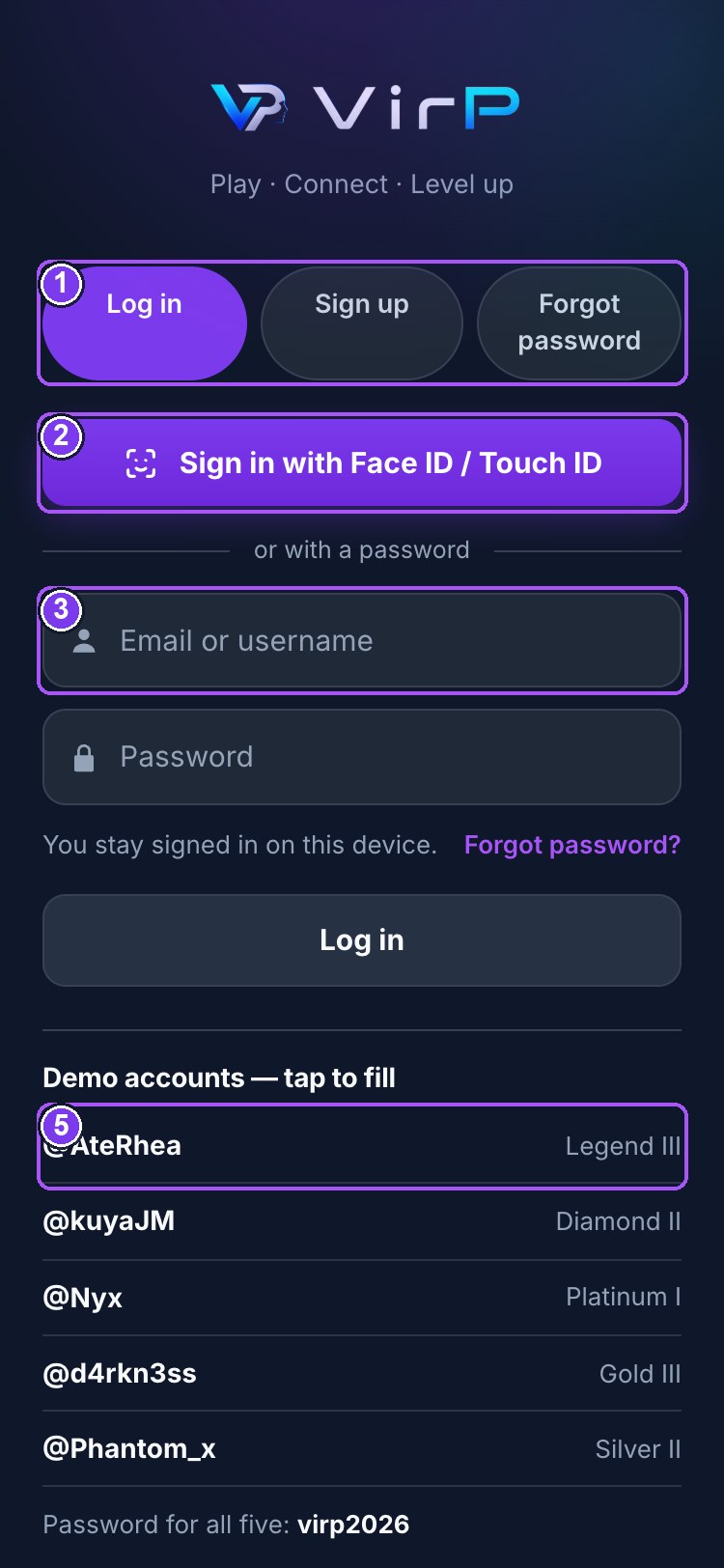
- 1Log in · Sign up · Forgot password — one screen
- 2Face ID / Touch ID — fires by itself on a device with a passkey
- 3Username or email (fallback)
- 4Google · Apple · Discord — official sign-in; grey until keys are added
- 5Tap a demo account to fill the form
Log in
Username or email, then password. Keep me signed in keeps you signed in for a year. Under the form, Demo accounts — tap to fill lists five ready-made players; tapping one fills the form. Password for all five: virp2026.
| Account | Tier | Try it for |
|---|---|---|
| @AteRhea | Legend III | the top of the ladder; the locked Diamond+ room; moderator role |
| @kuyaJM | Diamond II | the most endorsements; the trophy shelf; captain of Team Kalayaan |
| @Nyx | Platinum I | mid-ladder; a tournament champion’s Player Card |
| @d4rkn3ss | Gold III | a store you can only partly afford |
| @Phantom_x | Silver II | a new player; locked rooms and locked items |
Sign up
Handle (letters, numbers, underscore — no spaces), email, password, city, date of birth, the games you play, and a tick to accept the Terms, Privacy Notice and Community Guidelines. Everyone 13 and over is welcome. The form changes with your date of birth:
- Under 13 — no account. Come back on your 13th birthday.
- 13 to 17 — you must give a parent or guardian’s email; they receive a consent link. Your account opens in Viewer Mode (§16) and stays there until you turn 18 and verify.
- 18 and over — you are taken to Verify your account (§16). Until verification is approved you are in Viewer Mode too. Viewer Mode does not mean you are a minor — only that your age and identity have not been checked yet.
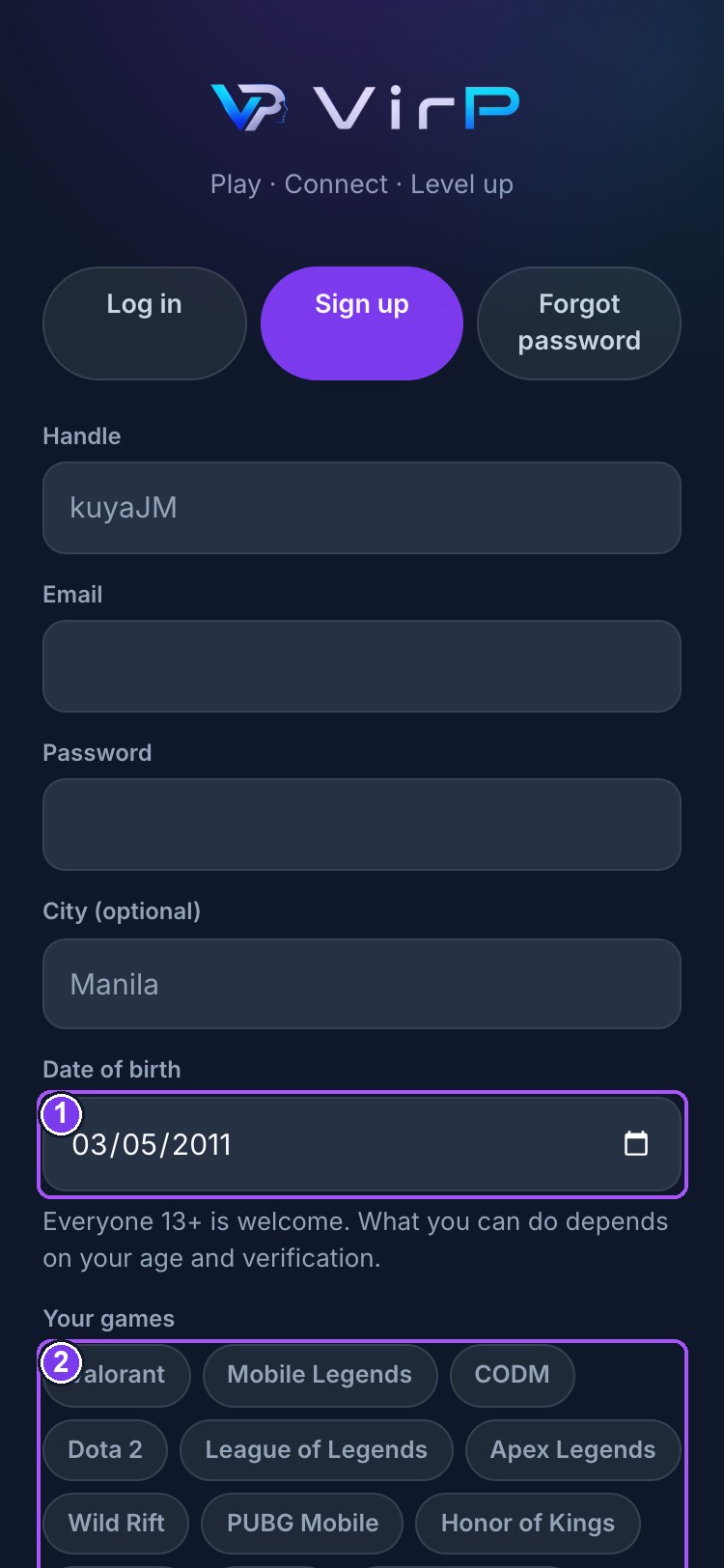
- 1Date of birth decides the age group — 13+ welcome
- 2Your games — shapes For You
- 3Terms · Privacy Notice · Community Guidelines
Forgot password
Enter your email; a reset link is sent that works for one hour and signs out every other device once used. If email is not connected on this server yet, an administrator can hand you the link from the console.
Run it as an app
On iPhone: Share → Add to Home Screen. On Android: the browser menu → Install app, or tap the banner. From the home-screen icon Virp opens full-screen with no address bar. On a laptop, just open the address — see §18.
4. The five tabs
On a phone, the bar along the bottom is on every screen except the feed, where it fades over the video. On a laptop or tablet in landscape the same destinations sit in a rail down the left, with News, Explore, Leaderboard, Notifications and Settings alongside.
| Tab | Icon | Takes you to |
|---|---|---|
| Home | house | the clip feed (§5) |
| Quests | star | browse, join, track and prove quests (§7) |
| Post | the raised purple + | opens your gallery straight away to pick a video (§6) |
| Community | speech bubble | communities by game and interest — announcements, tournaments, leaderboards, quests, members, discussions, chat (§8) |
| Profile | person | your own profile and statistics (§9) |
From the top of the feed: the ★ Stars balance opens the Store; the newspaper opens News; the magnifier opens Explore. On your profile, the ⚙ opens Settings.
5. Home — the feed
One clip fills the screen. Swipe up for the next, down for the previous. Clips play with sound; if your phone blocked it, a 🔇 Tap for sound chip appears — one tap and it stays on.
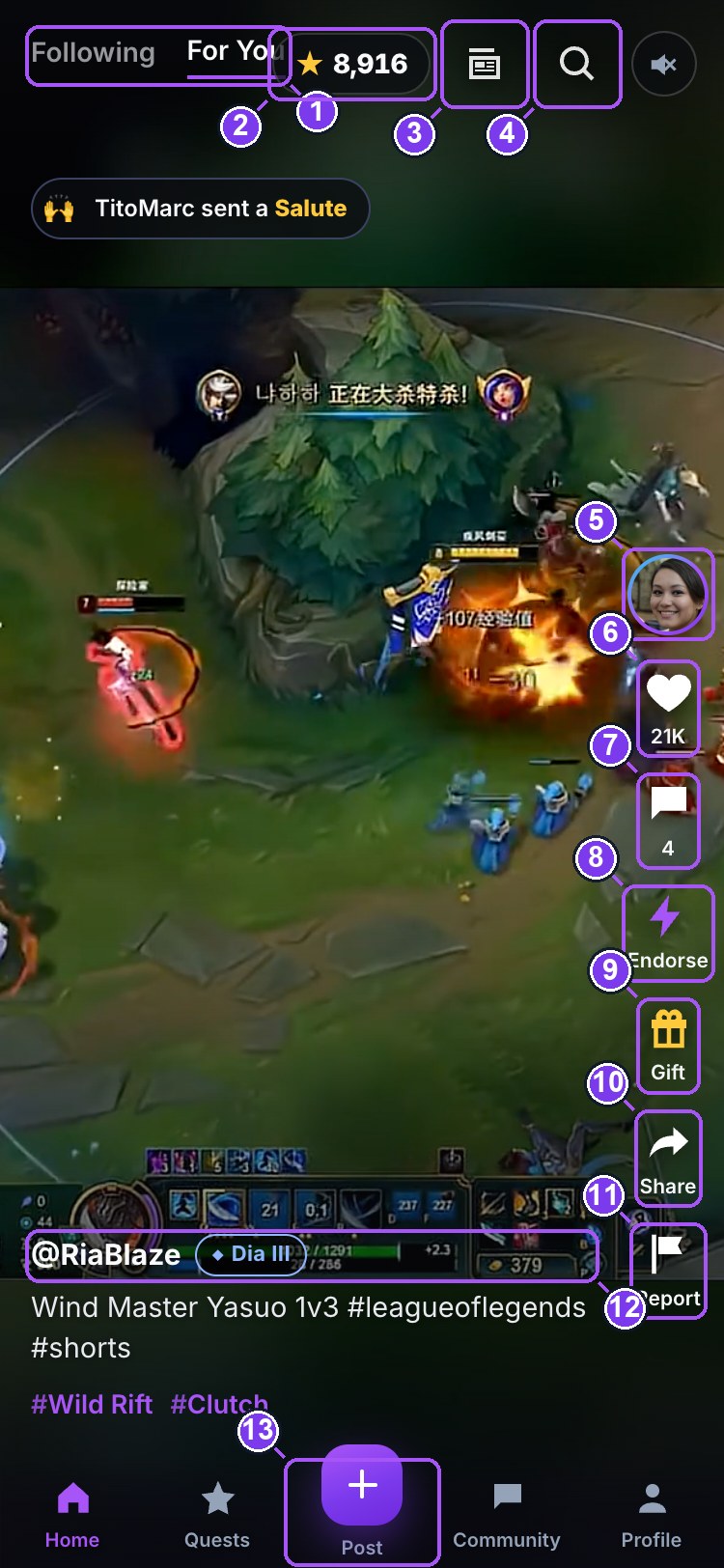
- 1Following / For You — two different feeds
- 2Your Stars. Tap to open the Store
- 3News & events
- 4Explore
- 5The creator — tap for their profile
- 6Like (+1★ to you)
- 7Comments
- 8Endorse a skill — the only action that moves rank
- 9Gift
- 10Share
- 11Report this clip (or block the creator)
- 12Handle + tier badge
- 13Post — opens your gallery (locked in Viewer Mode)
Top of the screen
- Following / For You — two feeds. Following is what the players you're connected with posted, newest first. For You leads with players you haven't met, weighted to your games.
- ★ 2,000 — your Stars balance, live. It ticks up as you earn. Tap it to open the Store.
- Magnifier — Explore: search games, players and clips.
The rail (right side, top to bottom)
- Avatar — the creator. Tap to open their profile.
- ♥ Heart — like. Turns red, pops, and if it paid you a Star a small +1★ flies off it. Double-tap anywhere on the video also likes. Likes pay +1★ to you, up to 20 a day. They do not move the creator's rank.
- 💬 Speech bubble — comments. Opens a sheet; the box to type in is pinned at the bottom. Commenting pays +1★, up to 20 a day.
- ⚡ Endorse (purple) — the one that matters. Pick a skill you're vouching for: Clutch, Aim, IGL, Comms, Game sense, Support. It gives the creator +10 reputation — the only rail action that moves rank — and pays them +10★. Once per skill per person; you can't endorse yourself.
- 🎁 Gift (gold) — send a gift with Stars (§13). The gift lands with an animation and shows as a chip on the clip.
- Share — the phone's share sheet, or copies the link.
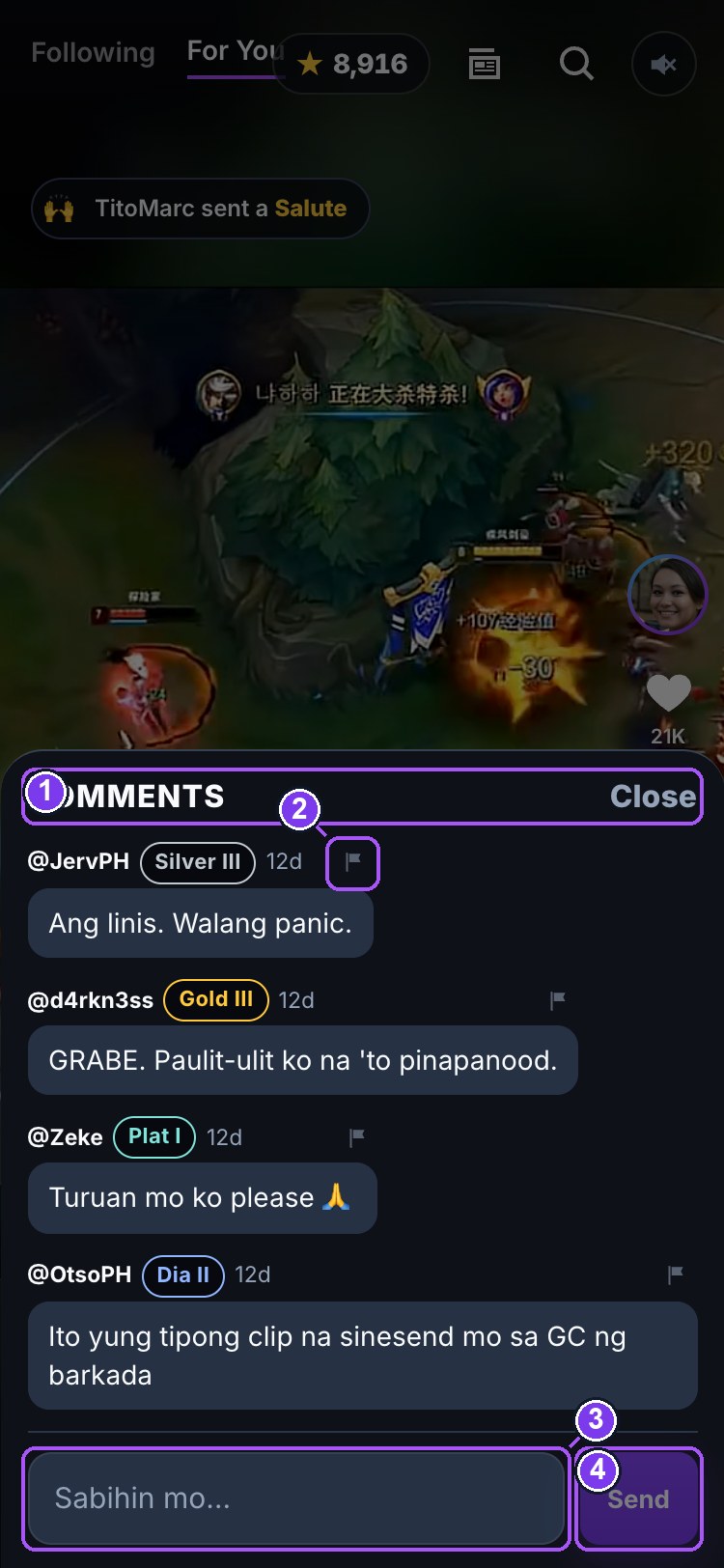
- 1Comments on this clip
- 2Report a comment
- 3Type here — always on screen
- 4Send (+1★)
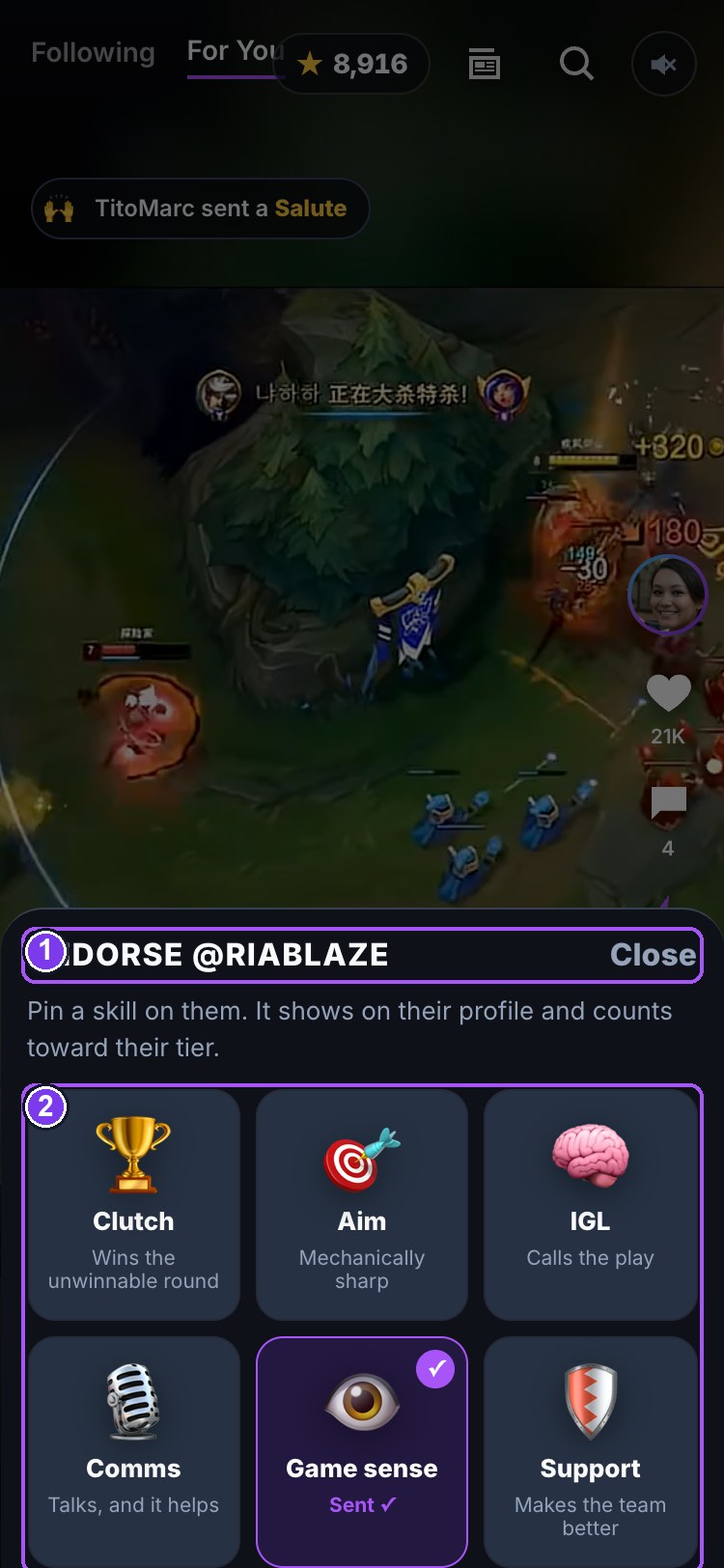
- 1Pick the skill you are vouching for
- 2Six skills — one endorsement per skill per player
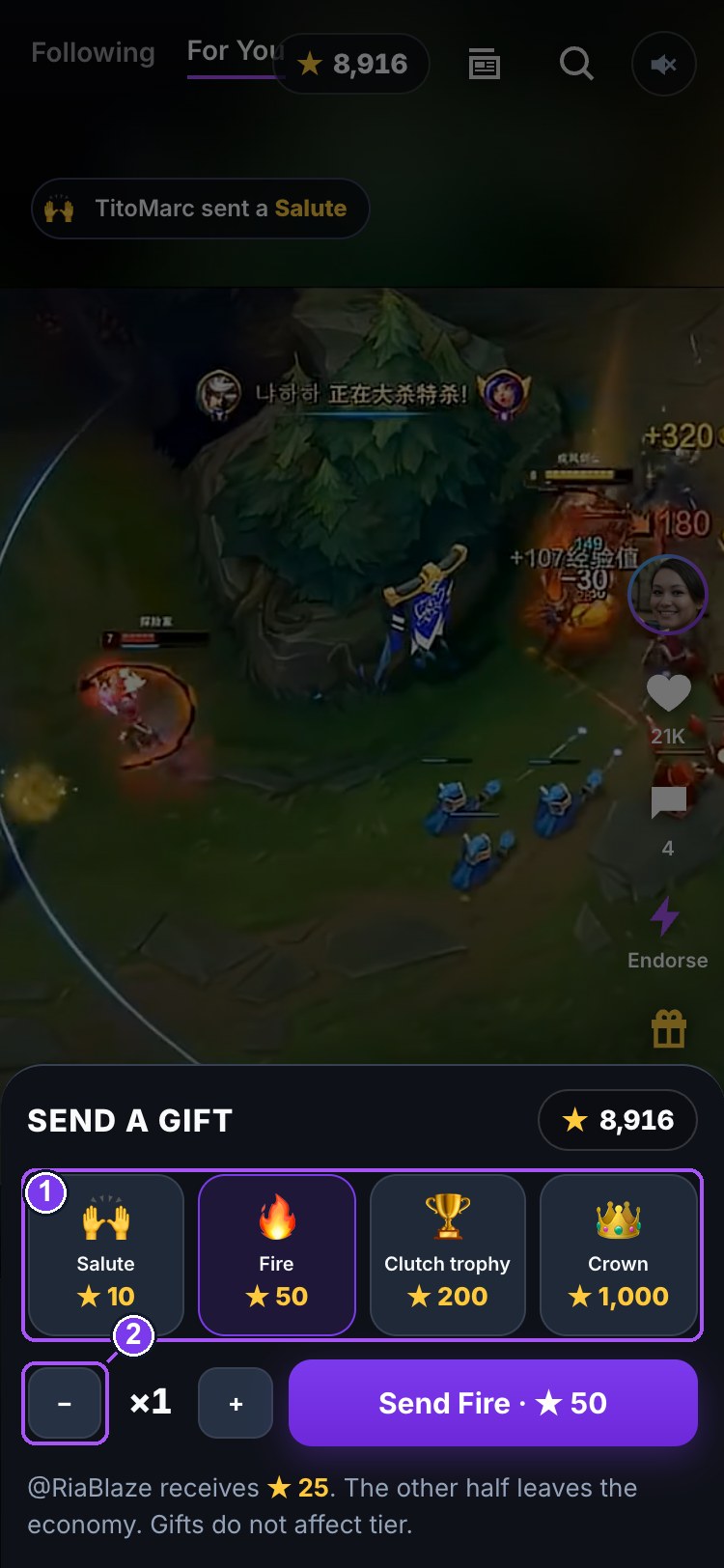
- 1Four gifts — Salute 10★ · Fire 50★ · Clutch 200★ · Crown 1,000★
- 2Send — you pay in full, creator gets half
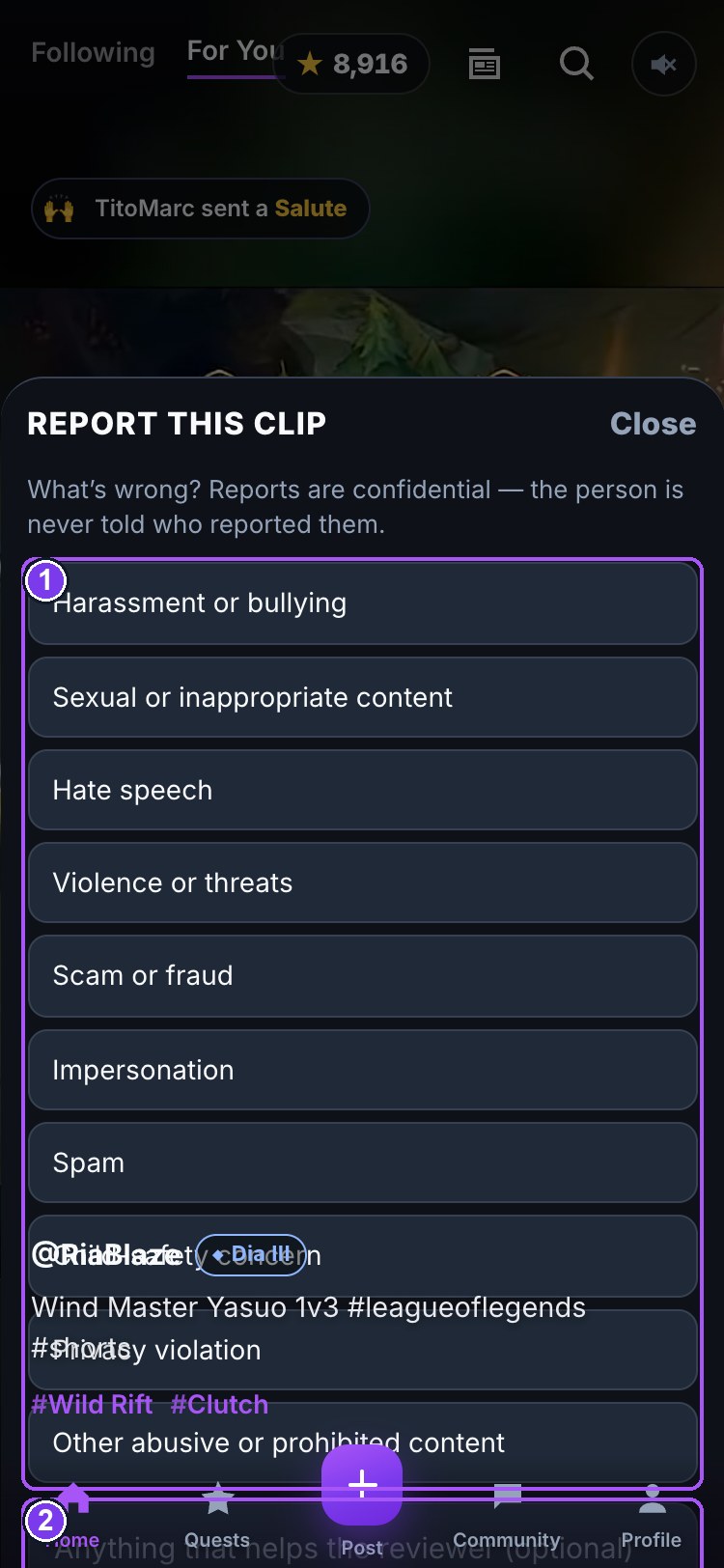
- 1Ten reasons — pick one
- 2A note for the reviewer (optional)
- 3Send report — confidential
- 4Block this player
On the video
- Single tap — pause / play. A play glyph shows while paused.
- Double tap — like, with the big heart.
- Watch to the end — pays +1★, once per clip, ever.
Bottom left
@handle with a tier badge (tap for the profile), the caption, and #hashtags for the game and the moment. A 🔥 @someone sent a Fire chip near the top shows the biggest gift the clip has received. A gold Sponsored label marks an advertiser's clip.
6. Post — the clip editor
- Tap the + tab. Your phone's gallery opens at once. Pick a video.
- Trim. Drag the purple handles on the strip under the preview. Clips are 8–60 seconds; the Next button stays off until the selection fits, and the server refuses anything outside it.
- Look. Six looks — None, Warm, Cool, Vivid, Mono, Fade. Applied when the clip plays; the file itself isn't changed.
- Stickers. Tap one to add it, drag it into place, × to remove. Up to six.
- Face cam (optional). Records you watching the clip back through the front camera; it plays as a round bubble on the clip.
- Caption, game, tags. The game tag is required. Up to four moment tags (Clutch, Ace, Funny, Teamplay…).
- Post. Uploads straight from the phone with a progress readout. +25★ the moment it's up. The feed opens on your clip.
Screen recording from inside a web app isn't possible — record with your phone's own recorder first, then post it here.
7. Quests — browse, join, prove, claim
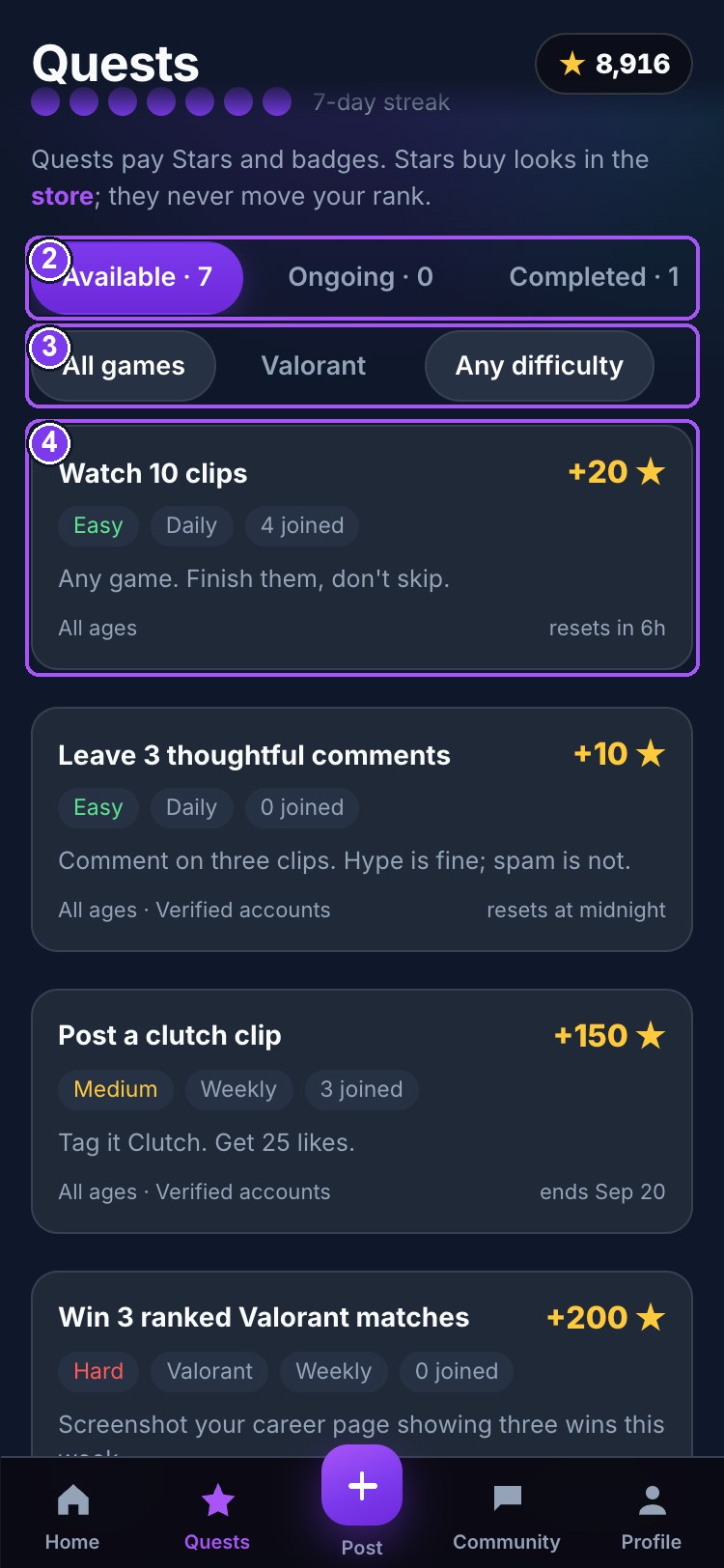
- 1Your rank and the bar to the next
- 2Available · Ongoing · Completed
- 3Filter by game and difficulty
- 4A quest — tap for the full sheet
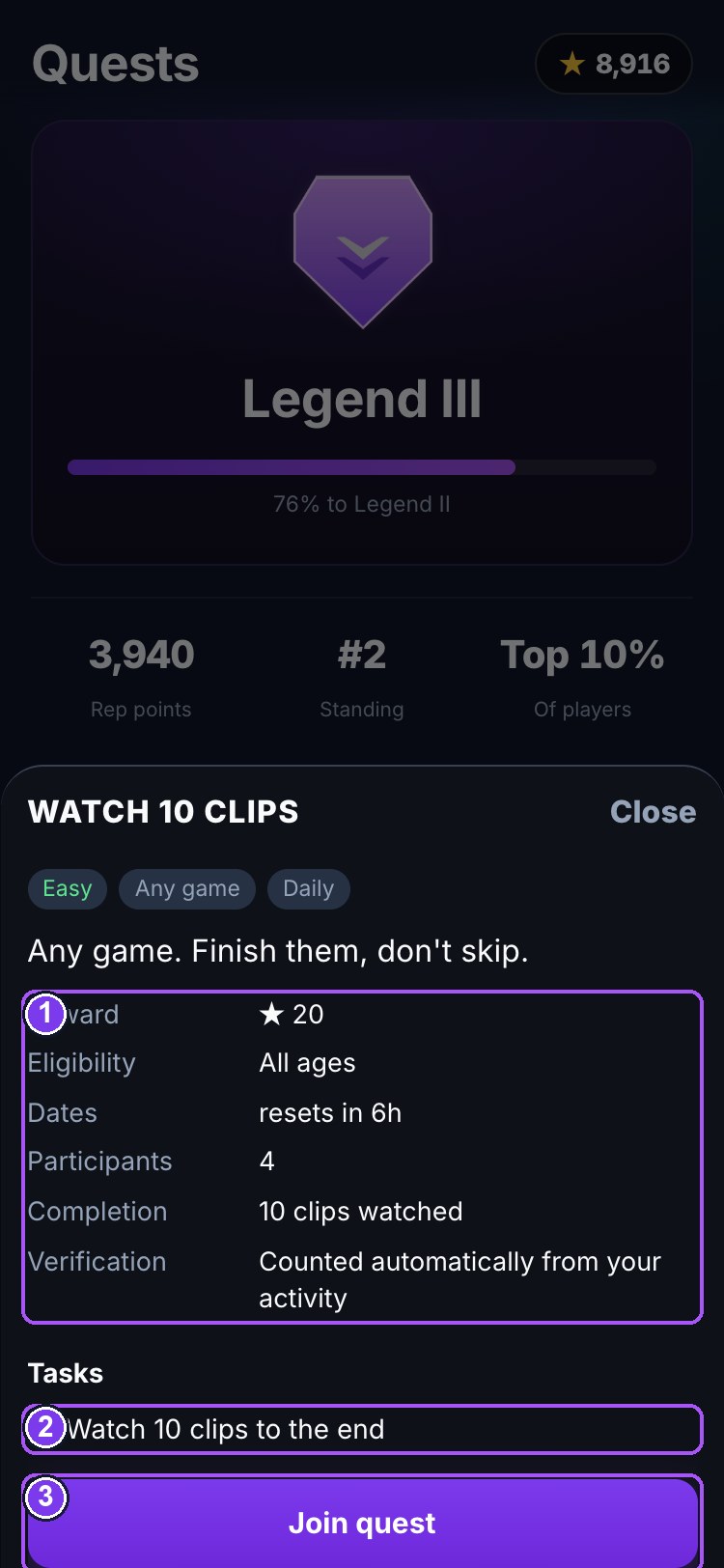
- 1Reward · eligibility · dates · participants · completion · verification
- 2Tasks
- 3Join · submit proof · claim — whichever applies now
The top card is your current tier and how far to the next one; the three figures under it are your reputation points, standing, and percentile. Below, three views — Available, Ongoing, Completed — and filters by game and difficulty.
Tap any quest to open its sheet: title and description, game, difficulty, dates, tasks, reward (Stars and sometimes a badge), number of participants, eligibility (age floor, verification, tier), completion requirement, verification method, and rules.
Two kinds of verification
- Counted automatically — clips watched, likes, comments, endorsements, connections, posts. Progress fills itself from what you actually did since you joined the quest. You cannot type a number in.
- Screenshot proof — join, play, then Send for review with a screenshot. A moderator approves or rejects it (and can flag edited images). Approved → Claim your Stars.
A quest with a 🔒 tells you why you cannot join yet: under the age floor, not verified, or your tier is not there. Under-18 accounts see only age-appropriate quests. Stars from quests buy looks in the store; they never move your rank.
8. Community
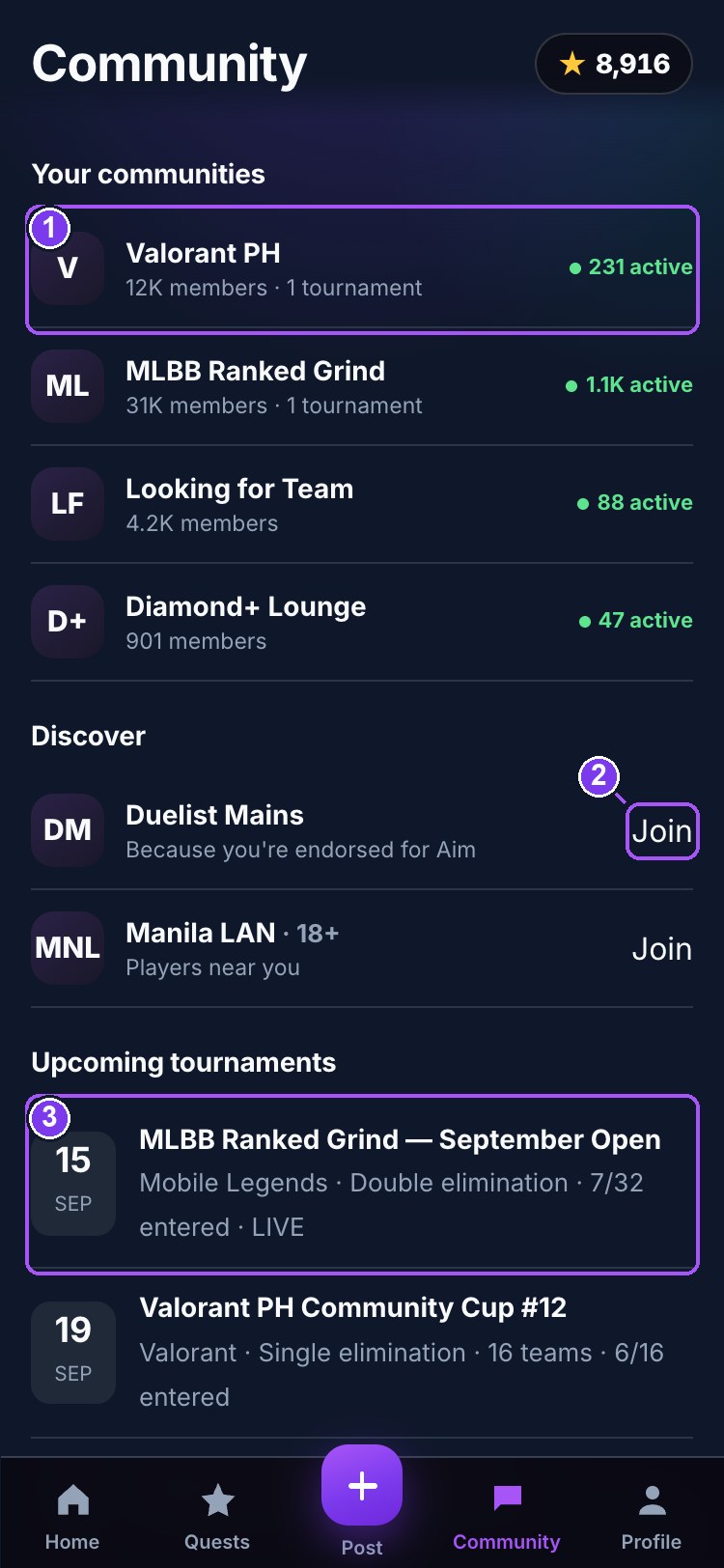
- 1A community — members, tournaments, lock if any
- 2Join
- 3Upcoming tournament
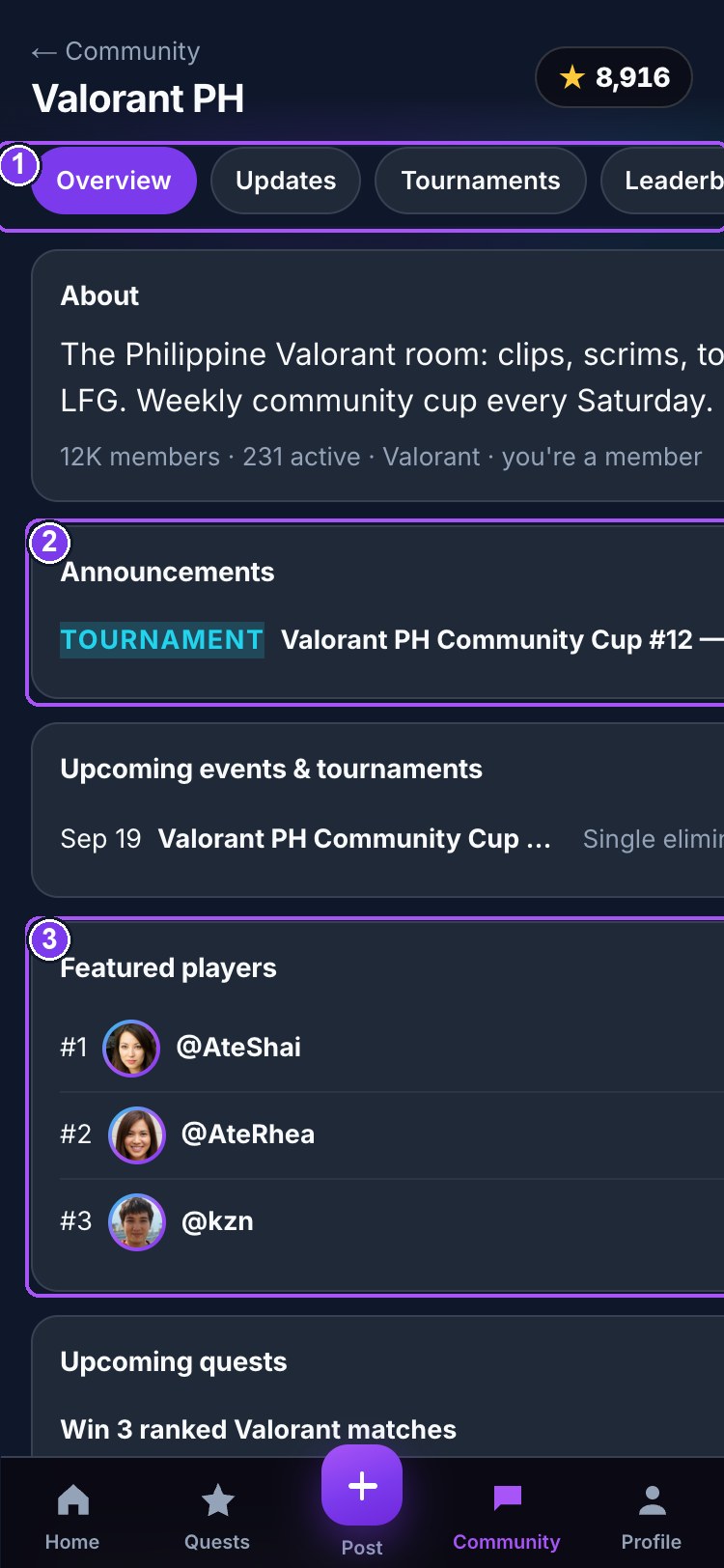
- 1Overview · Updates · Tournaments · Leaderboards · Quests · Members · Discussions · Chat
- 2Announcements
- 3Featured players
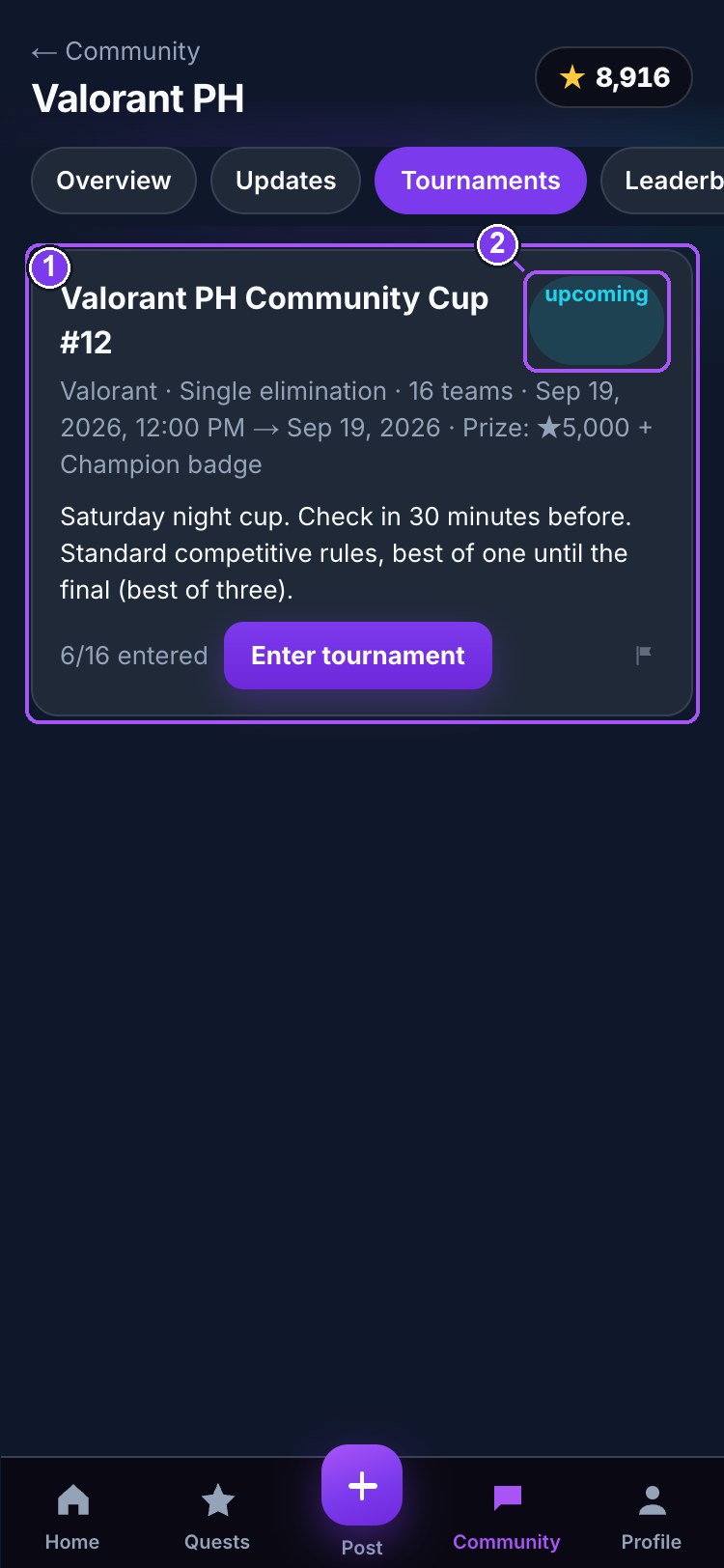
- 1A tournament — format, dates, prize, entries
- 2Enter, or your entry status
The index lists Your communities, Discover, upcoming tournaments and teams recruiting. Some communities are 🔒 locked: by tier (the Diamond+ Lounge opens at Diamond I) or as 18+ rooms that need a verified adult account. Stars open neither door.
Inside a community, eight tabs:
| Tab | What is in it |
|---|---|
| Overview | about, announcements, upcoming events, featured players, upcoming quests, community achievements, team recruitment, the latest poll, and the safety and community guidelines |
| Updates | announcements and tournament updates posted by administrators for this community |
| Tournaments | schedule, format, prize, entries, Enter tournament, and results with placements |
| Leaderboards | members by reputation (the ranking that decides tier) and the highest Star balances |
| Quests | quests tied to this community |
| Members | everyone in the room, with tier and verification mark |
| Discussions | threads with replies (recruitment posts live here) and polls |
| Chat | the live room — messages refresh every few seconds |
Chat, discussions and polls follow the account rules (§16): verified adults post and reply; everyone signed in can read and vote. Every message, discussion, tournament and community has a Report control (§17).
9. Profile — the brag page
Everything a player is measured by, on one screen. Your own is under the Profile tab; anyone else's opens when you tap their avatar or handle.
- Avatar, name, games · city, tier badge. The ring around the avatar and the frame are cosmetics from the Store.
- Rank card — current rank and the bar to the next.
- Clips · Endorsed · Connections — three counts.
- ★ Store · Verify account (your own profile) — or Connect on someone else's. Connections are mutual: you request, they accept. Demo players accept at once.
- #12 of 40 players · #3 in Valorant · Top 30% — your ranking. Tap it for the Leaderboard.
- Games — every game you play, with clips and likes in each. Your Main game is the one you post most.
- Endorsed for — skills other players vouched for, with counts.
- Trophies — gifts received, by kind, and your top supporters.
- Who noticed you — recent endorsements and milestones.
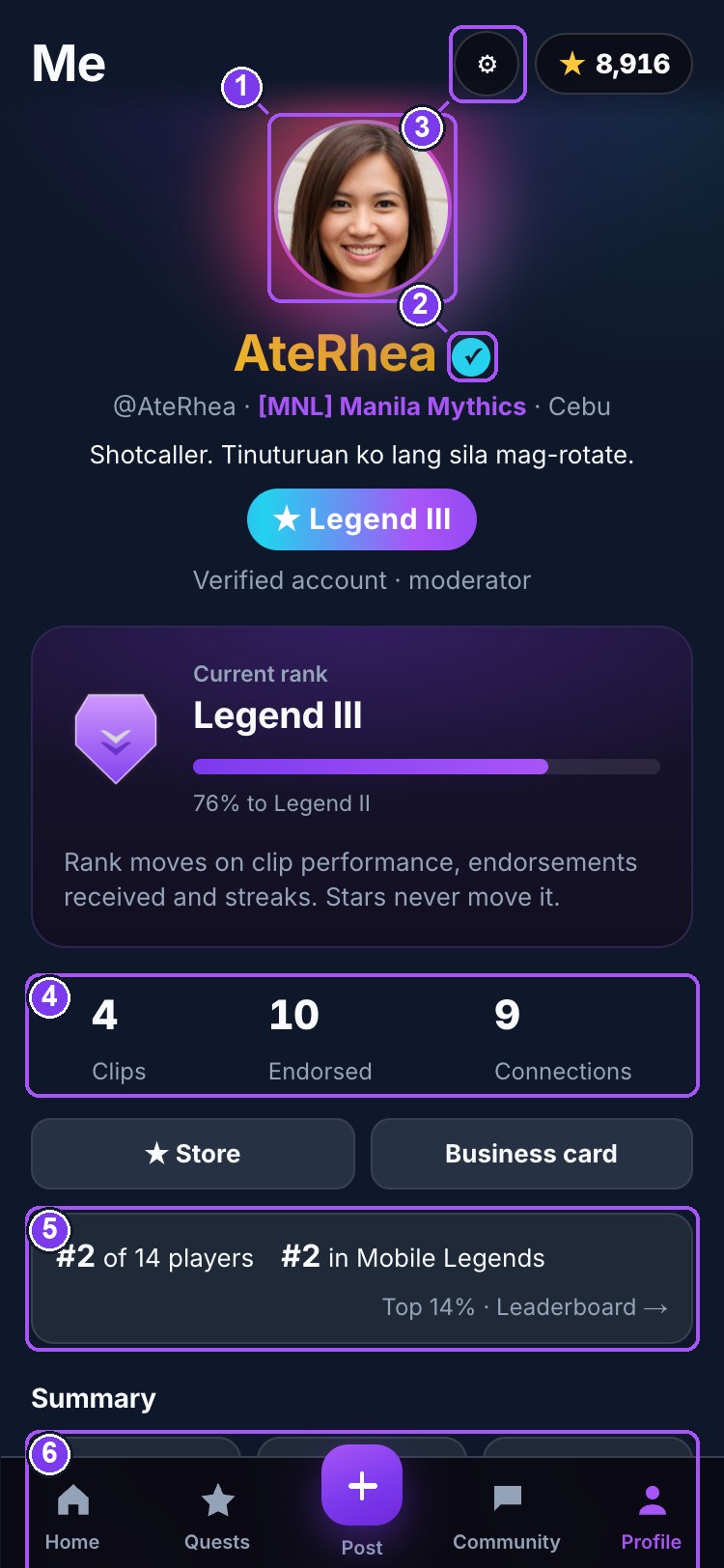
- 1Avatar — frame and ring are Store cosmetics
- 2Verified mark
- 3Settings
- 4Clips · Endorsed · Connections — each opens its list
- 5Ranking — tap for the Leaderboard
- 6Summary — quests, tournaments, awards, points
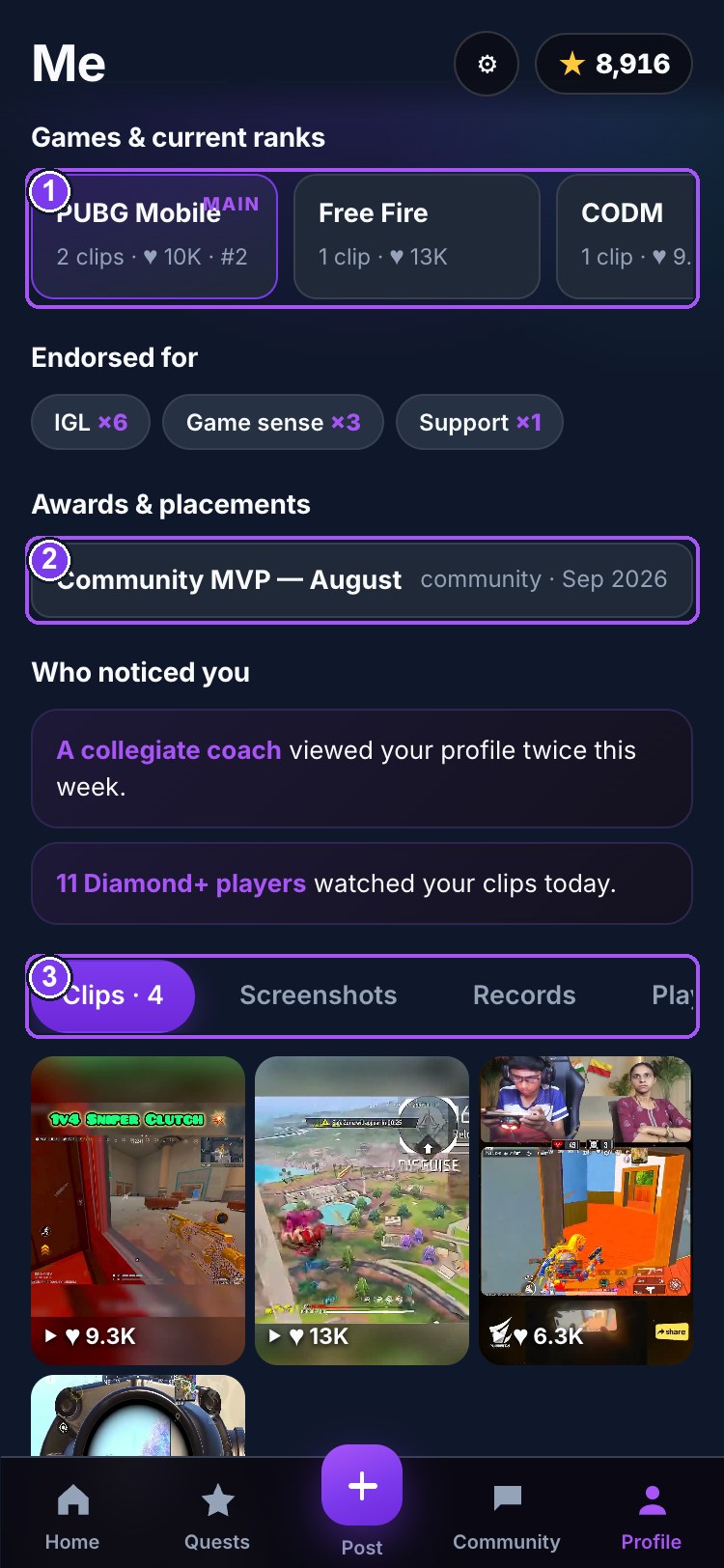
- 1Games and current ranks — tap for that game's leaderboard
- 2Awards and placements — written by tournaments and quests
- 3Clips · Screenshots · Records · Player Card
The four tabs
- Clips — your posted clips with like counts. Tap to play.
- Screenshots — stills: scoreboards, MVP screens, moments. Add a screenshot picks from the gallery, takes a caption and a game, and posts it. Tap one to view full-size; Remove deletes your own.
- Records — your personal records, computed live: most-liked clip, likes received, total views, most talked-about clip, signature skill, biggest gift received, Stars earned all-time, streak, playing since.
- Player Card — your essentials on one shareable card in your tier's finish: picture, name, verified mark, team, two large panels for Game and Rank, six stats, achievements, serial, and a QR code that opens your public profile. Share my card renders it as an image and opens the share sheet; Copy profile link copies the address. Nothing on the card flashes. The serial (VRP-2026-XXXX-XXXX) is unique to your account and never changes. It is not an NFT — minting needs wallets and real money, which Virp keeps out on purpose.
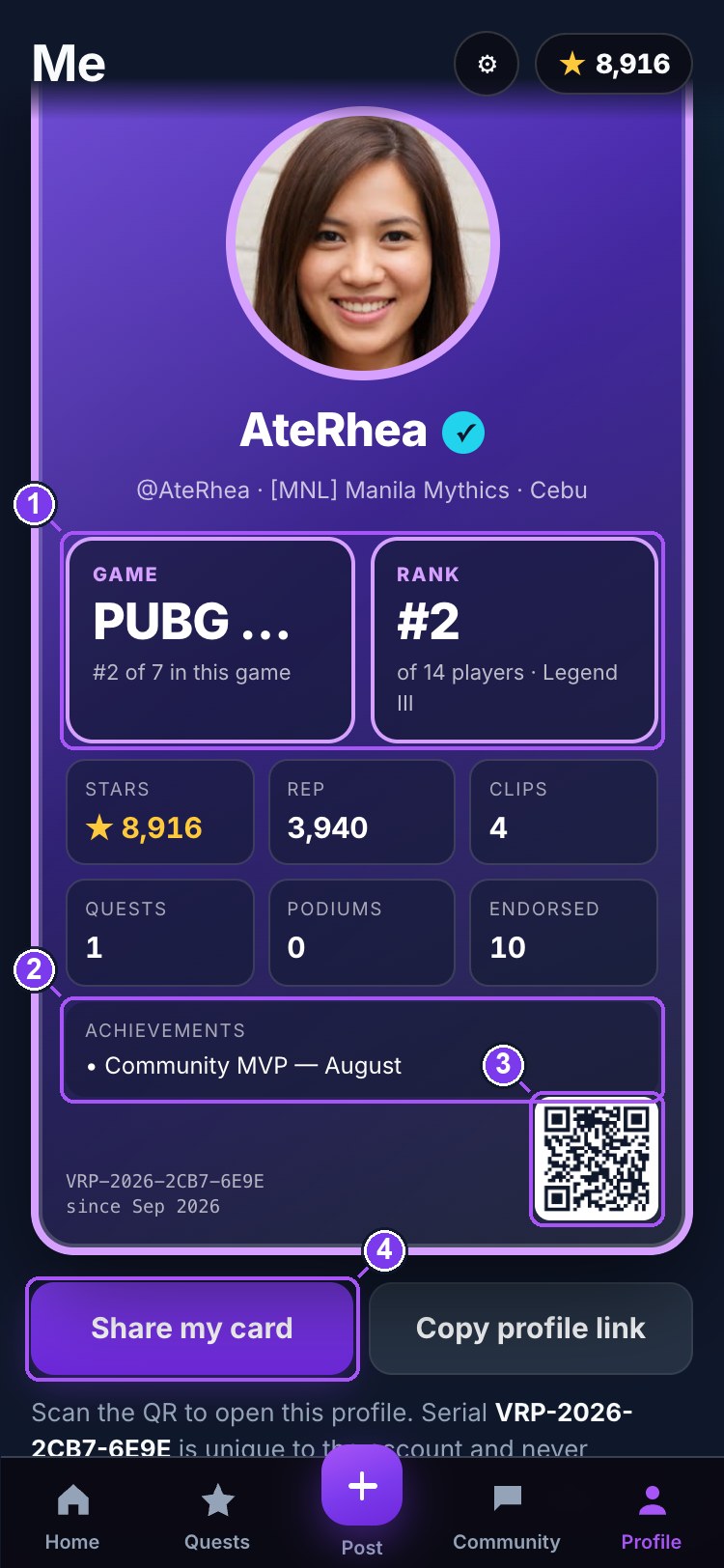
- 1Game and Rank — the two big panels
- 2Achievements
- 3QR code — opens this profile
- 4Share the card as an image
Connections, Settings, business card
Tap the Connections number for the list (requests for you appear at the top with Accept). The ⚙ on your profile opens Settings: picture, display name, city, bio, games, the four privacy switches, your Face ID / Touch ID devices, and blocked accounts. Verified adults also get Business card (§16).
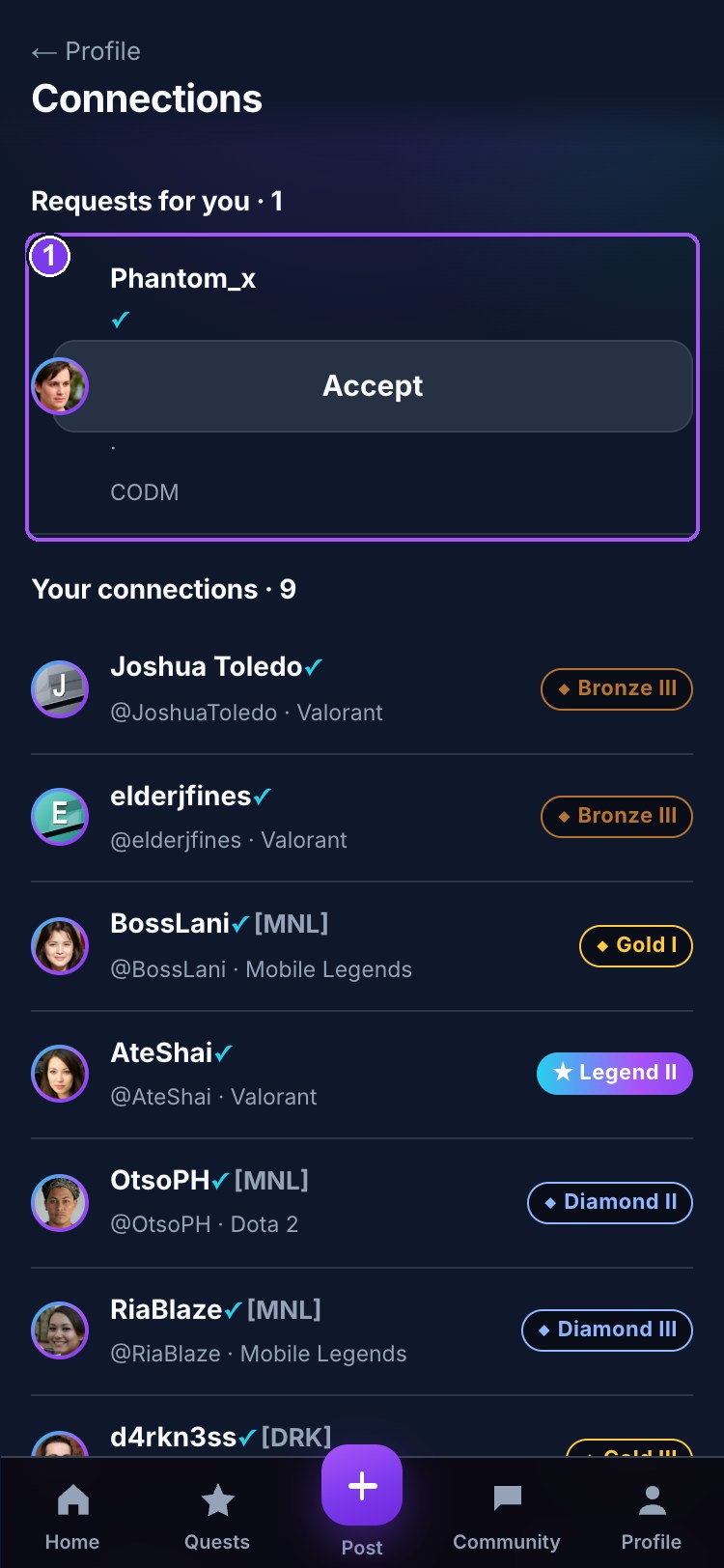
- 1A connection — tap for their profile
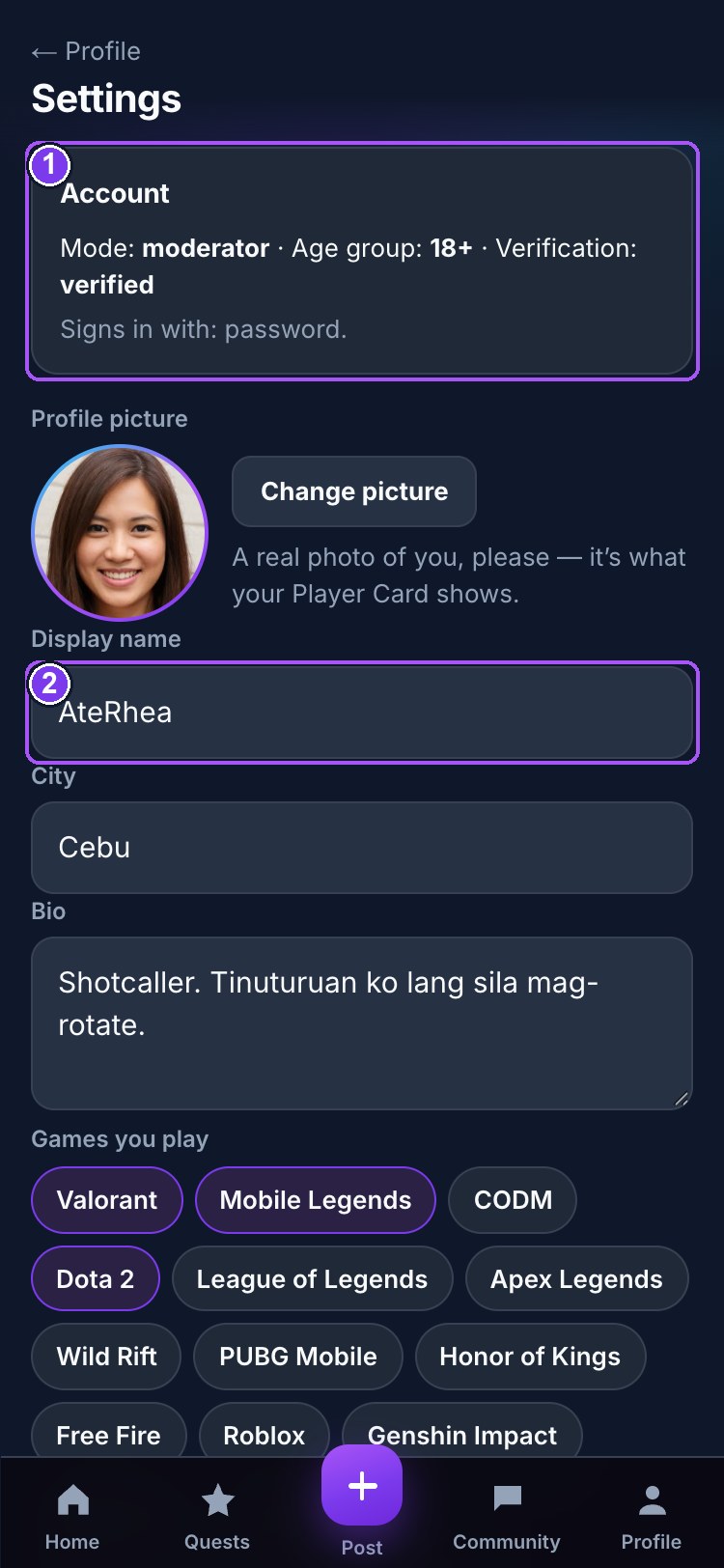
- 1Your mode, age group and verification
- 2Basics you can change
- 3Privacy — who sees what on your profile
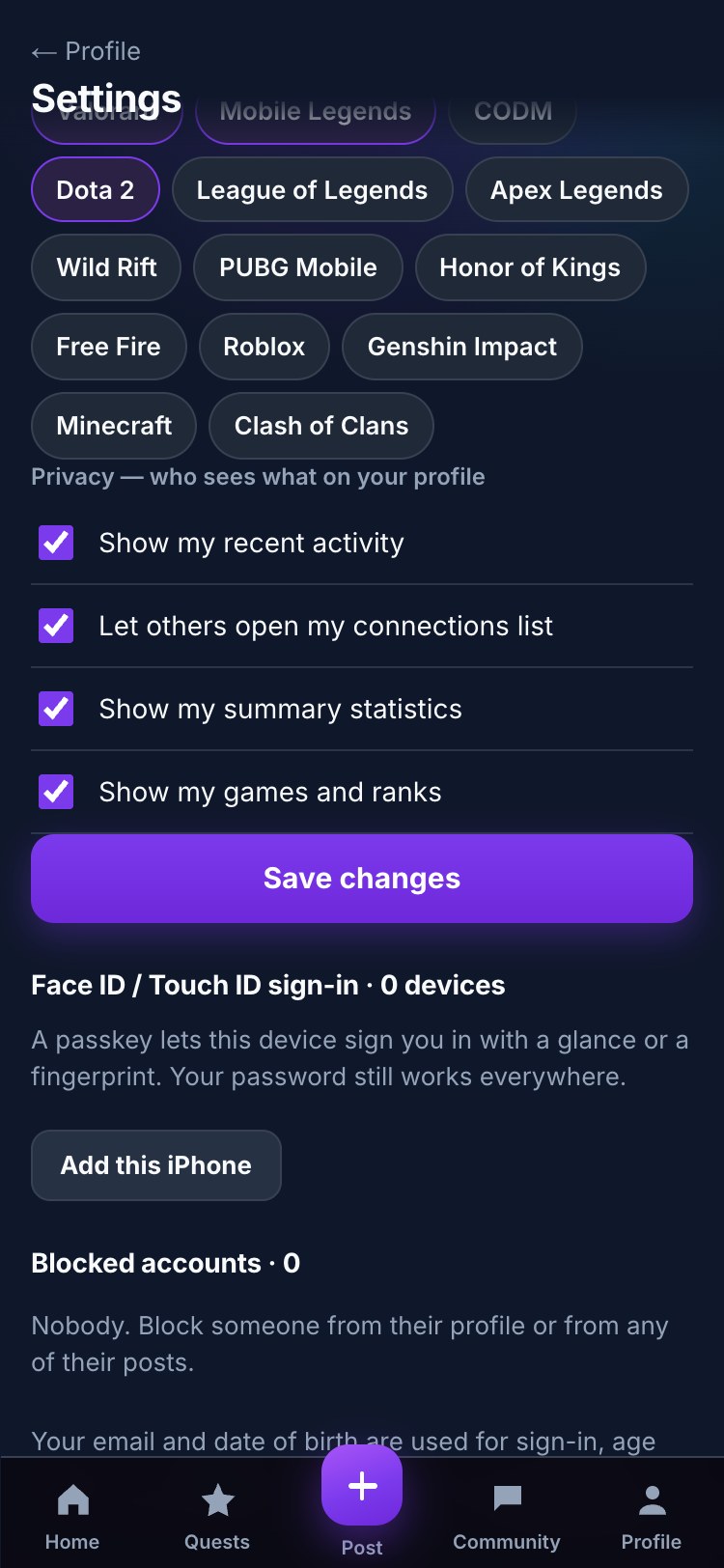
- 1Add this device — Face ID / Touch ID next time
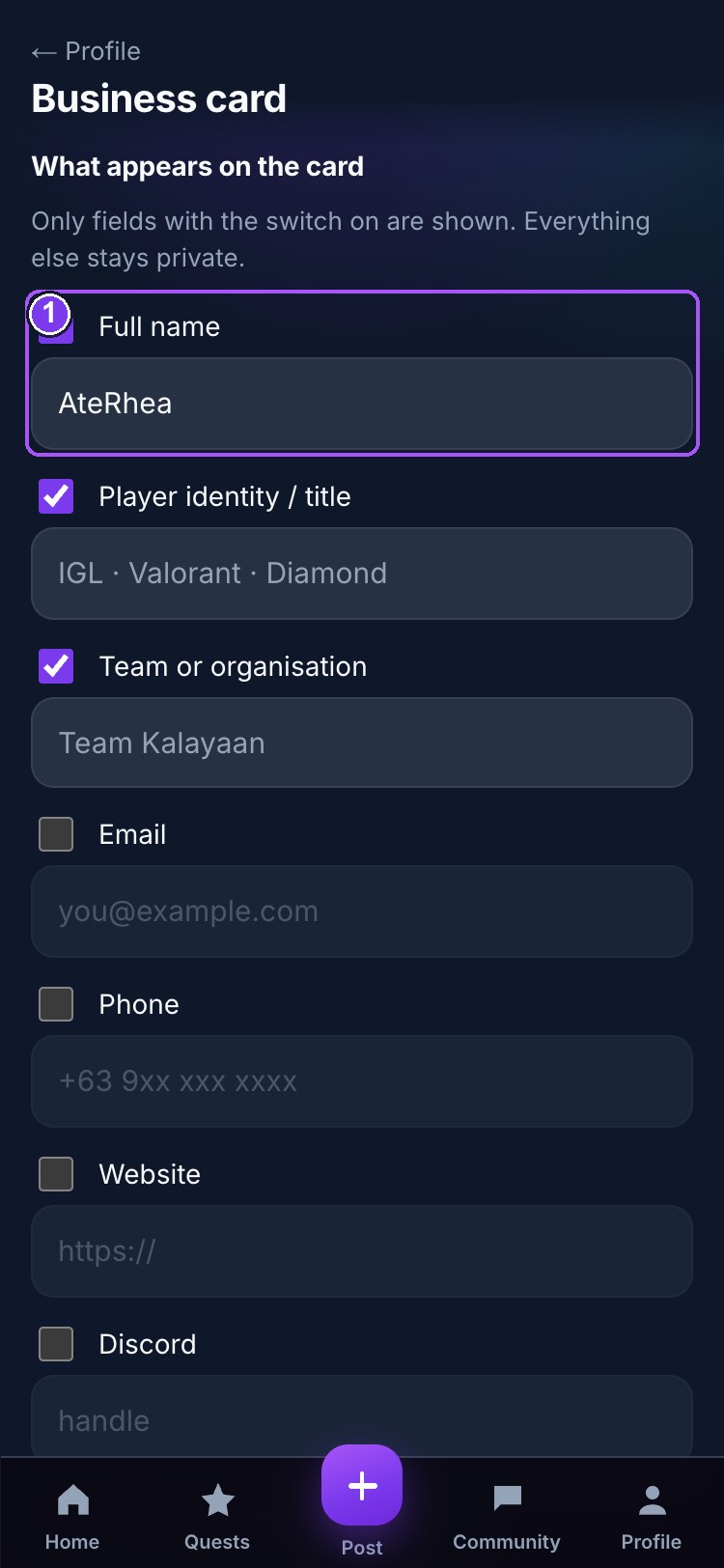
- 1Each field has its own switch
- 2Waiver · privacy · restrictions · consent
- 3Preview — what the public link shows
10. News, Explore, Leaderboard, Store, Notifications
News & events
News (newspaper icon on the feed, or the rail on desktop) carries gaming and esports news, Virp announcements, community updates, tournament schedules, events, quest updates, leaderboard changes and results. Filter by type, game, community and date (upcoming, this week, this month). Administrators write and pin posts from the console.
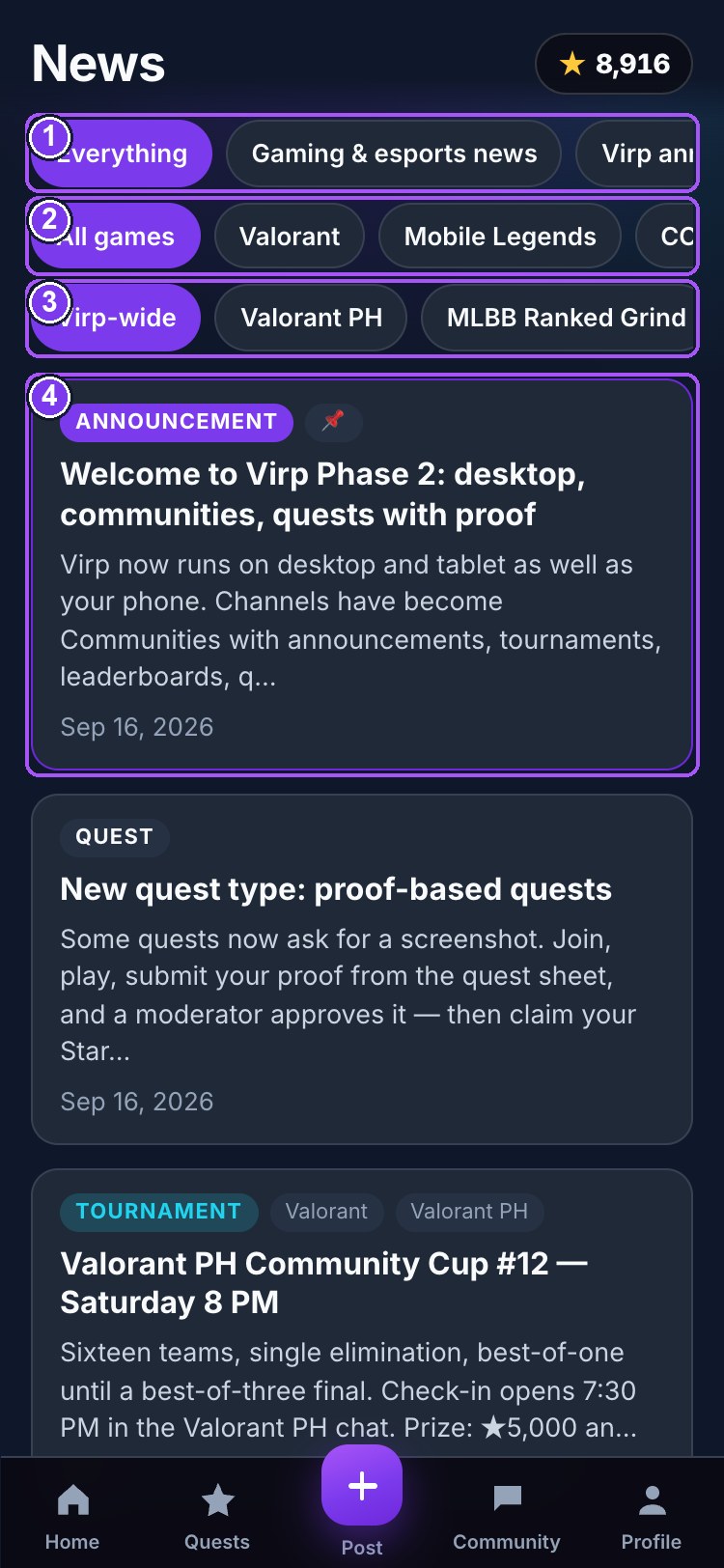
- 1Filter by type
- 2Filter by game
- 3Filter by community and date
- 4A post — tap to read
Explore
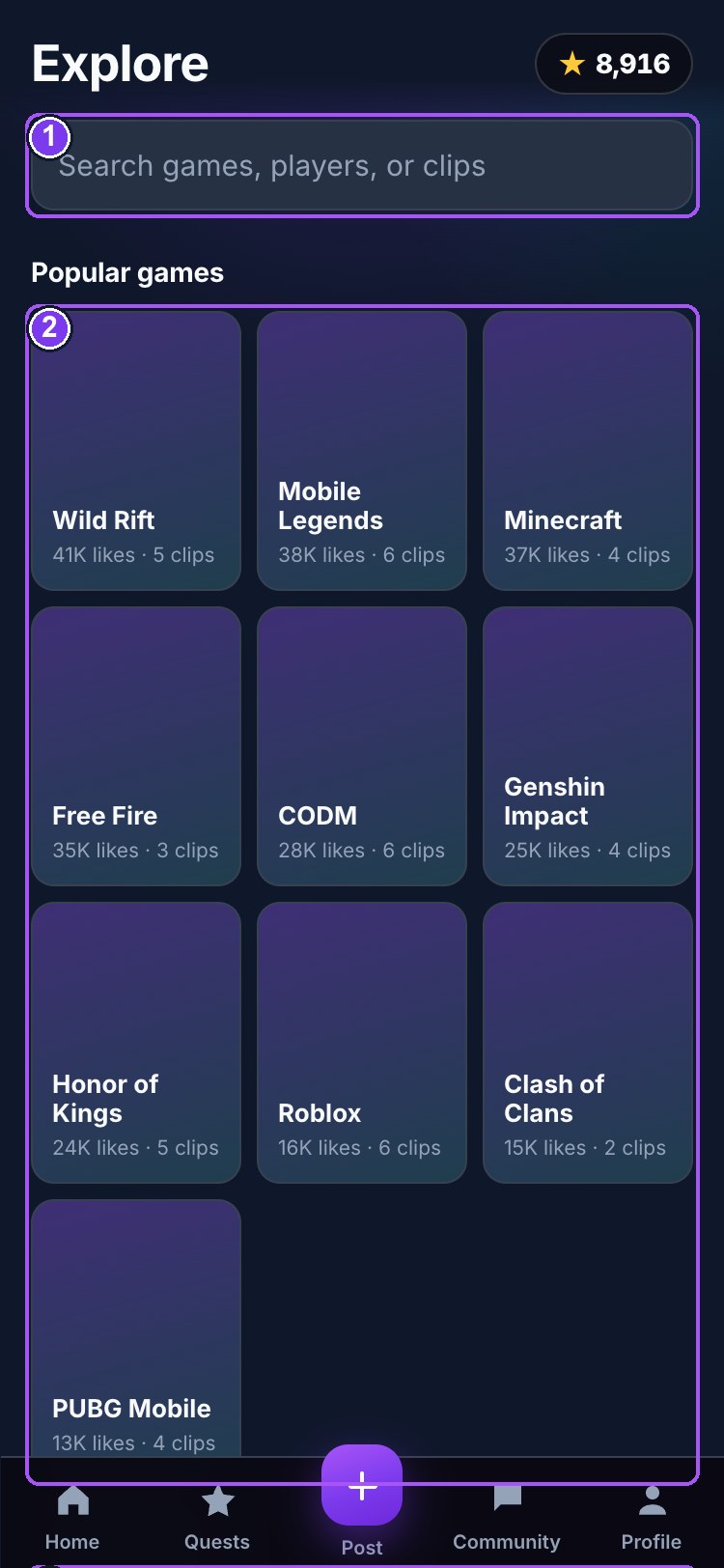
- 1Search — filters as you type
- 2Popular games, counted from real clips
- 3Trending clips
Search players by handle, browse games, and see the most-liked clips.
Leaderboard
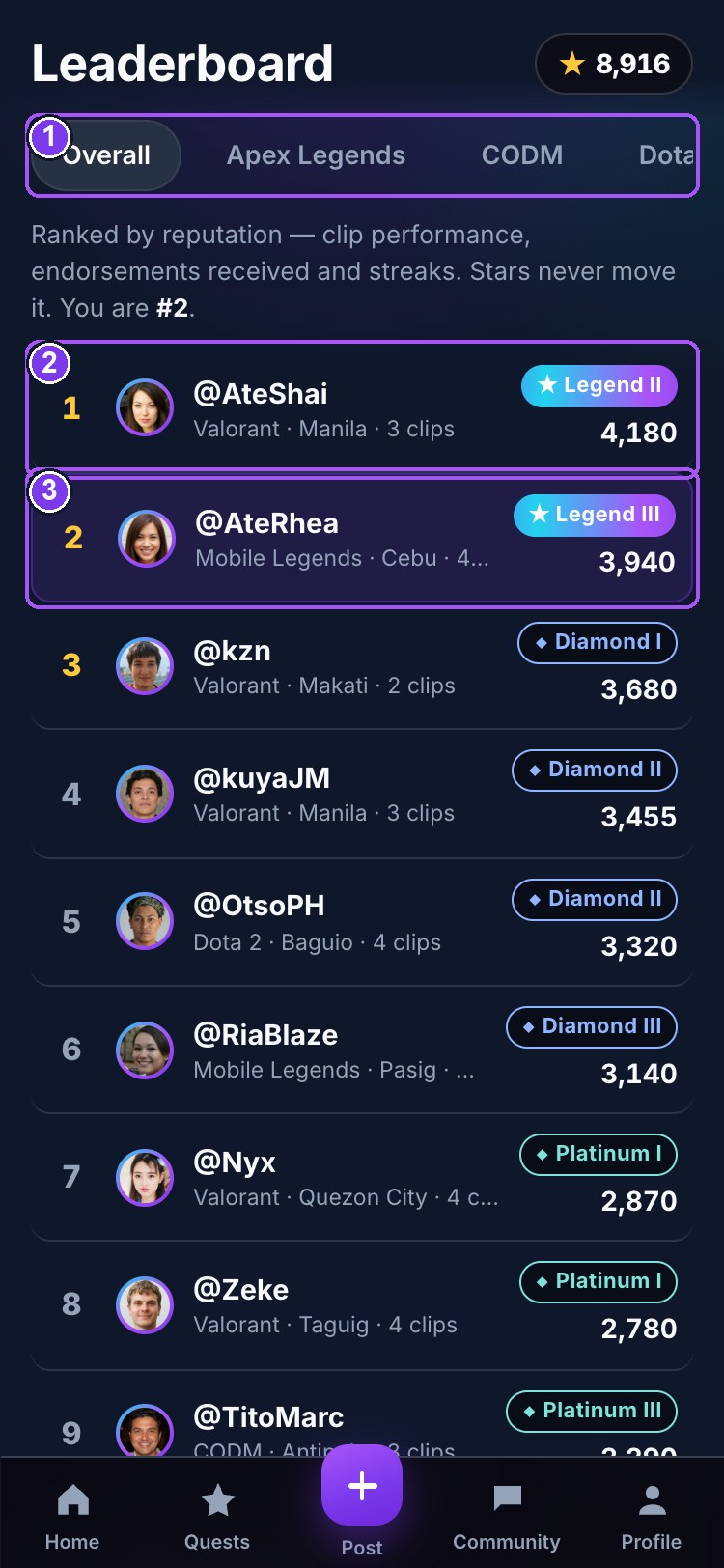
- 1Overall, or one game
- 2Ranked by reputation
- 3You
Every player who has posted, ranked by reputation. Filter by game. Your own row is highlighted. Stars never enter this ranking.
Store
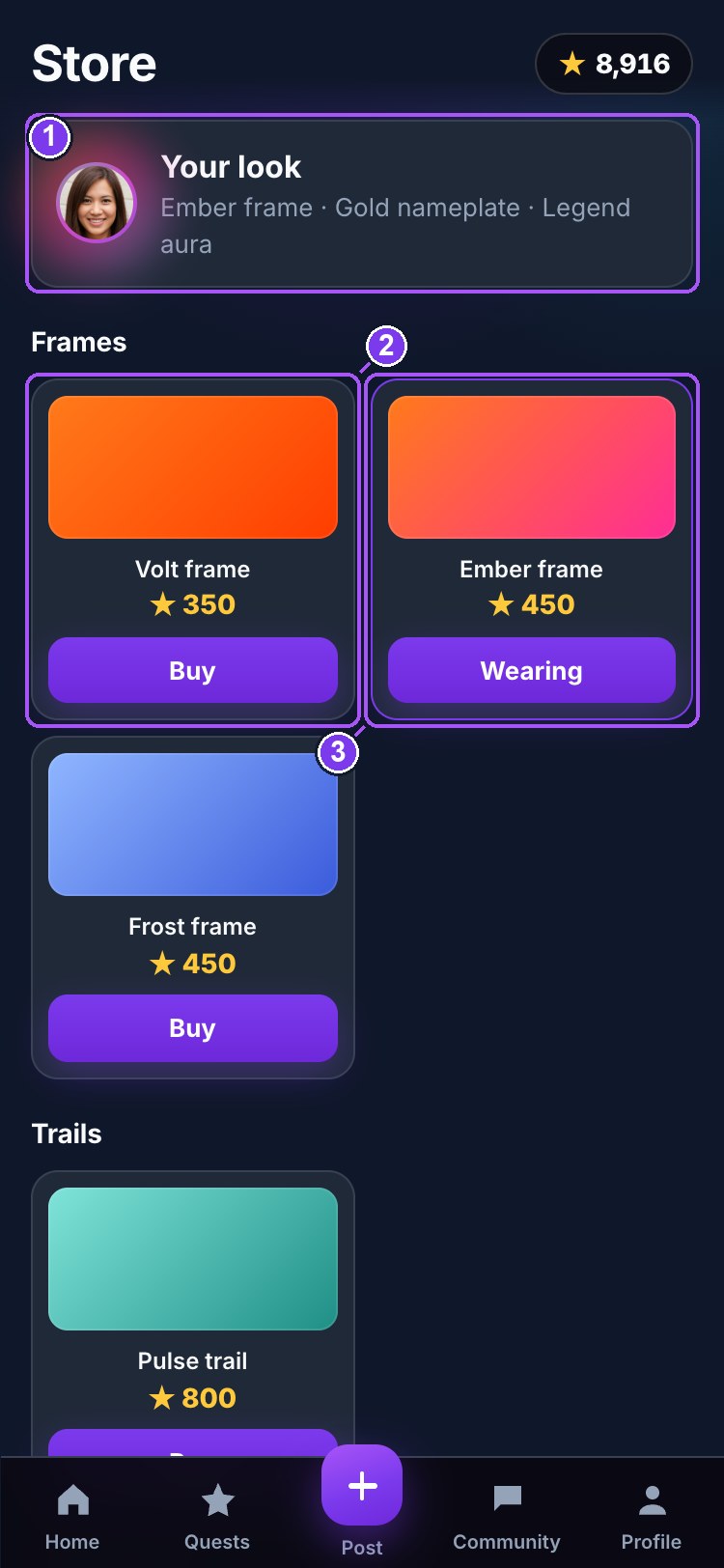
- 1What you are wearing
- 2An item — price in Stars
- 3Owned / equipped
Frames, nameplates, tags, trails. Priced in Stars; a few are earned by tier and cannot be bought. Equip from your inventory.
Notifications
Likes, comments, endorsements, gifts, connection requests and quest results.
11. Stars — the money table
| You… | You get | Limit |
|---|---|---|
| sign up | +50★ | once |
| watch a clip to the end | +1★ | once per clip |
| like a clip | +1★ | 20 a day |
| comment | +1★ | 20 a day |
| post a clip | +25★ | per clip |
| get endorsed | +10★ | per endorsement |
| a clip of yours hits 100 likes | +50★ | per clip |
| complete a quest | the quest's reward | per quest |
| receive a gift | half its price | — |
Stars are spent in the Store and on gifts. They are earned, never bought — there is no way to put money in. Unliking does not take a Star back.
12. Tiers — the ladder
Six named tiers, each in three divisions (III → II → I), 18 rungs. Every rung is 250 reputation. Reputation comes from exactly three places: +10 per endorsement received, +1 per 10 likes a clip earns, +5 per streak day. Nothing else.
Legend is the only animated badge on the platform. Some rooms and store items unlock by tier.
13. Gifts
| Gift | Costs the sender | Creator receives | Burned |
|---|---|---|---|
| 🙌 Salute | 10★ | 5★ | 5★ |
| 🔥 Fire | 50★ | 25★ | 25★ |
| 🏆 Clutch trophy | 200★ | 100★ | 100★ |
| 👑 Crown | 1,000★ | 500★ | 500★ |
From the 🎁 button on any clip that isn't yours. Pick a gift and a quantity, Send. It lands with an animation, shows as a chip on the clip, and adds to the creator's trophy shelf. Gifts never move anyone's rank.
14. Every icon, in one place
| ★ gold | Stars — the currency. Tap the balance for the Store. |
| ♥ heart | Like. Red when you have. |
| 💬 bubble | Comments. |
| ⚡ bolt, purple | Endorse a skill — the only thing that moves rank. |
| 🎁 gift, gold | Send a gift. |
| ↗ arrow | Share. |
| 🔇 | Sound is off — tap for sound. |
| ▶ in a circle | Paused — tap to play. |
| ◆ / ★ badge | Tier badge. ★ is Legend. |
| 🔒 | Locked by tier. |
| Gold Sponsored | An advertiser's clip or quest. |
| Magnifier | Explore. |
| Purple + | Post a clip. |
15. What is real and what is not
Real, and recorded: every Star movement, rank change, endorsement, gift split, connection, upload, comment, report, block, verification decision, quest proof, tournament placement, award — and every administrator action, in an audit log. Still deliberately out:
- No real money. Stars cannot be bought, cashed out or converted. Gifting runs on earned Stars only.
- Nothing talks to a game. Automatic quests count what you do in Virp; in-game results come through screenshot proof that a person reviews.
- The Player Card is not an NFT. It is a generated, serialised image with a QR code. Minting is a later step that needs wallets and real money.
- Provider sign-in and provider verification switch on when their keys are added (Google, Apple, Discord; Stripe Identity). Until then: password sign-in and moderator-reviewed verification.
- Email (password reset, guardian consent, urgent-report paging) sends once the email service key is added; the console shows the same links meanwhile.
- Demo players — the seeded accounts are cast, not people. They accept every connection request and are marked verified so the demo is alive.
16. Age groups, Viewer Mode and verification
Three facts decide what an account can do: age group (from the date of birth you typed, replaced by the one on your ID once verified), verification, and role.
| Viewer Mode under 18, or an adult not yet verified | Verified member 18+, verified | |
|---|---|---|
| Watch approved clips, news, events, public profiles, leaderboards | ✓ | ✓ |
| Like, endorse, vote in polls, join quests and tournaments you are eligible for | ✓ | ✓ |
| Edit your own basics (name, city, bio, games, picture, privacy) | ✓ | ✓ |
| Report and block | ✓ | ✓ |
| Upload clips and screenshots | — | ✓ |
| Comment, chat, start discussions, send gifts, connect | — | ✓ |
| Share contact details, publish a business card | — | ✓ |
| Enter 18+ communities, quests and tournaments | — | ✓ |
Verifying (18 and over)
Profile → Verify account. Four steps: choose your government ID; photograph it with the camera (a gallery photo is accepted for the ID only); take a live selfie — the camera opens and you follow a prompt; a photo from your gallery is not accepted here; confirm your date of birth and tick the consent. A moderator compares the selfie with the ID, checks the date of birth, and approves or rejects with a reason you can act on. The images are deleted the moment a decision is made; only the decision and date are kept. Where the verification provider is connected, the same steps run inside the provider and Virp never sees the documents at all.
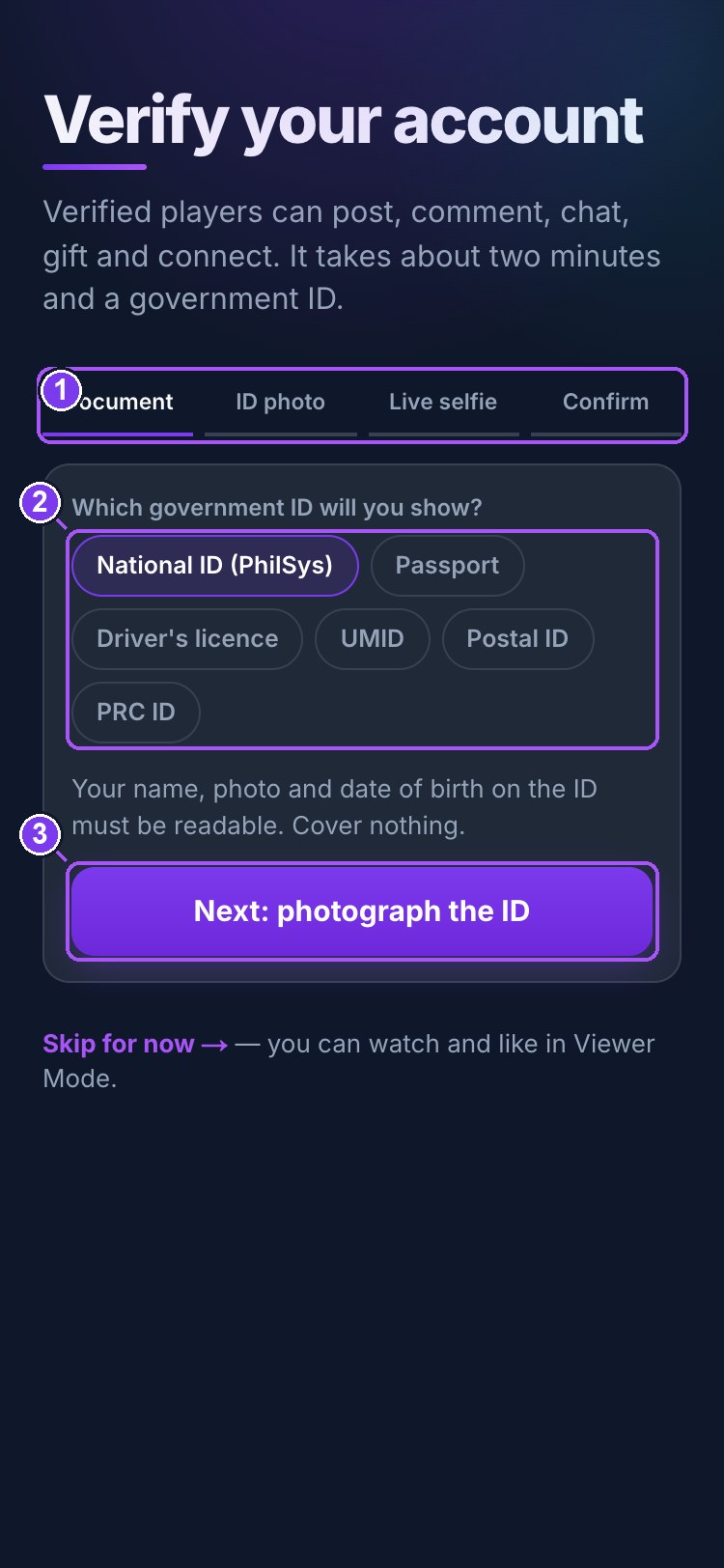
- 1Four steps: document · ID photo · live selfie · confirm
- 2Which government ID
- 3Next
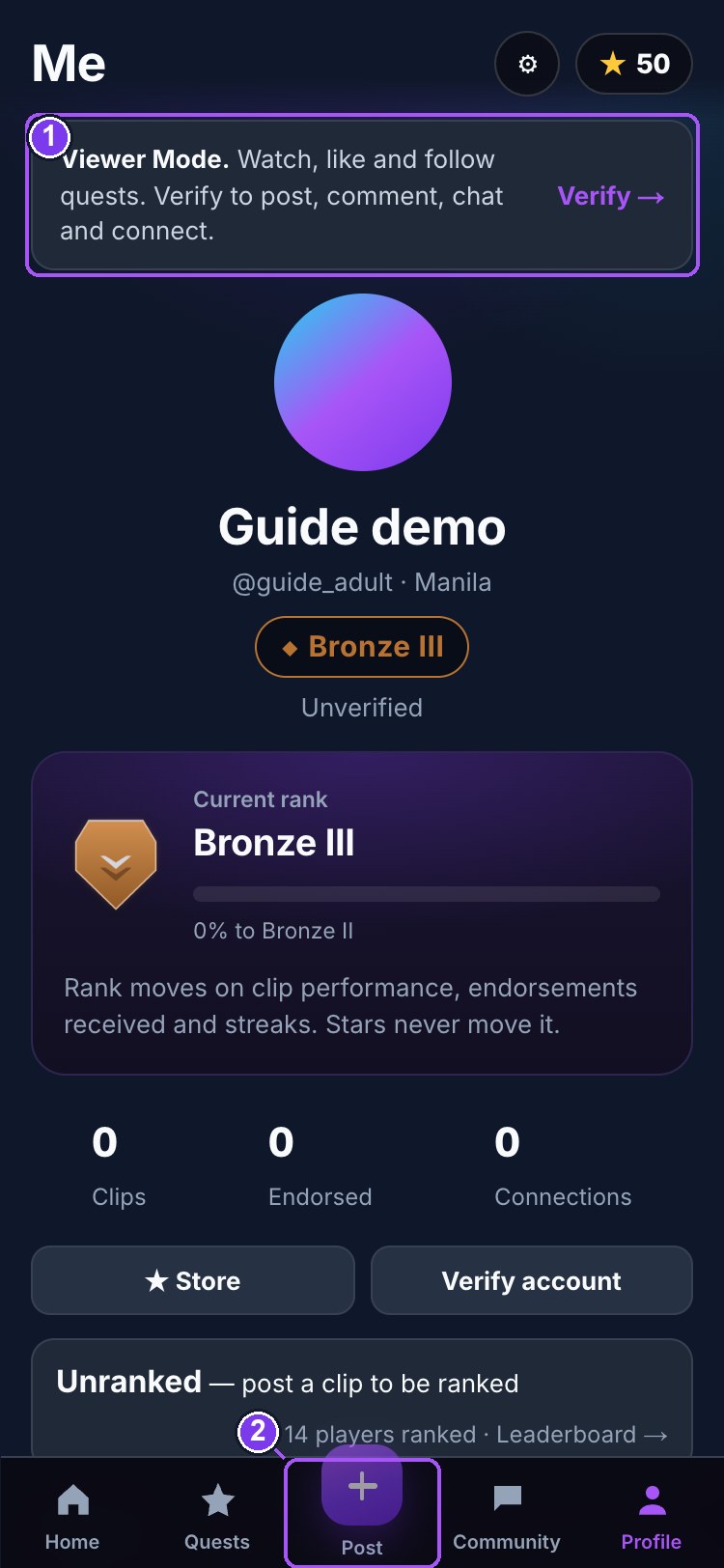
- 1Viewer Mode — what it means and how to leave it
- 2Post is locked until verified
Verified accounts carry a ✓ next to the name, on the Player Card and in member lists.
Under 18
Sign-up asks for a parent or guardian’s email and sends them a consent link that explains exactly what the account can and cannot do. The account works in Viewer Mode meanwhile. Contact details on business cards are never shown to under-18 accounts.
17. Reporting, blocking and moderation
Every clip (⚑ on the rail), comment, message, discussion, profile (⚑ top right), community, tournament and news post has a Report control. Pick a reason — harassment or bullying, sexual or inappropriate content, hate speech, violence or threats, scam or fraud, impersonation, spam, child-safety concern, privacy violation, other — add a note if you like, send. Reports are confidential.
- Block — from a person’s profile or any of their posts. You stop seeing each other’s content, and any connection is removed. Manage blocks in Settings.
- Automatic hiding — three separate reports on one item hide it pending review. A child-safety or violence report hides it immediately and pages every administrator.
- Review — moderators see reports in a queue with the reported item in place, and can hide, un-hide, dismiss, escalate or restrict the account. Every action is written to the audit log with who did it and when.
- Restricted accounts cannot sign in and see the reason at the door.
18. Desktop, laptop and tablet
Open the same address on any screen. Under about 900 pixels wide (phones, tablets in portrait) you get the phone layout with the bottom tab bar. Wider than that: a navigation rail on the left, the feed as a centred 9:16 column on a dark stage, and reading pages in two or three columns — profile with the header pinned beside the statistics, quests in a grid, communities in cards, the admin console with its own sidebar. Sheets become centred dialogs. Nothing needs to be installed.
19. For administrators and moderators
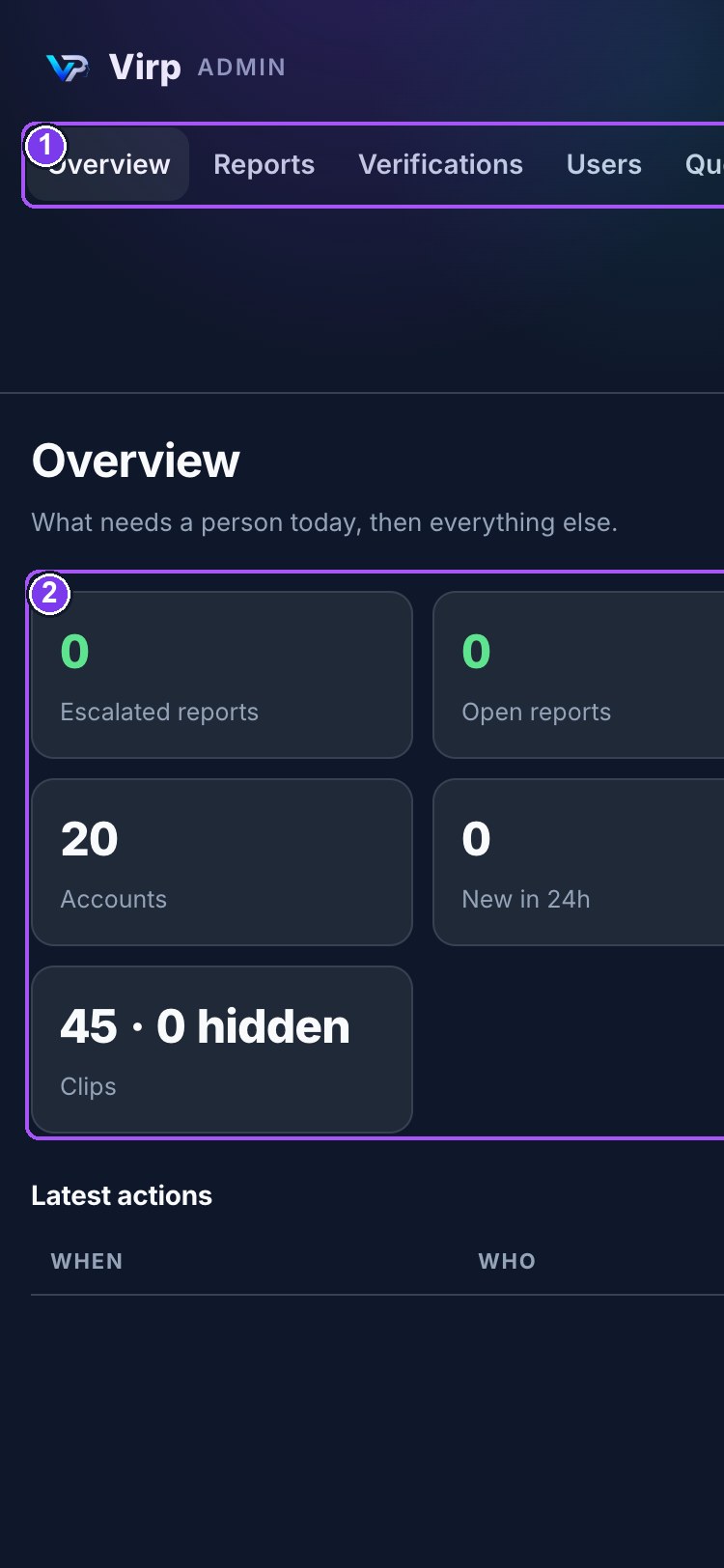
- 1Reports · Verifications · Users · Quests · News · Tournaments · Communities · Audit
- 2What needs a person today
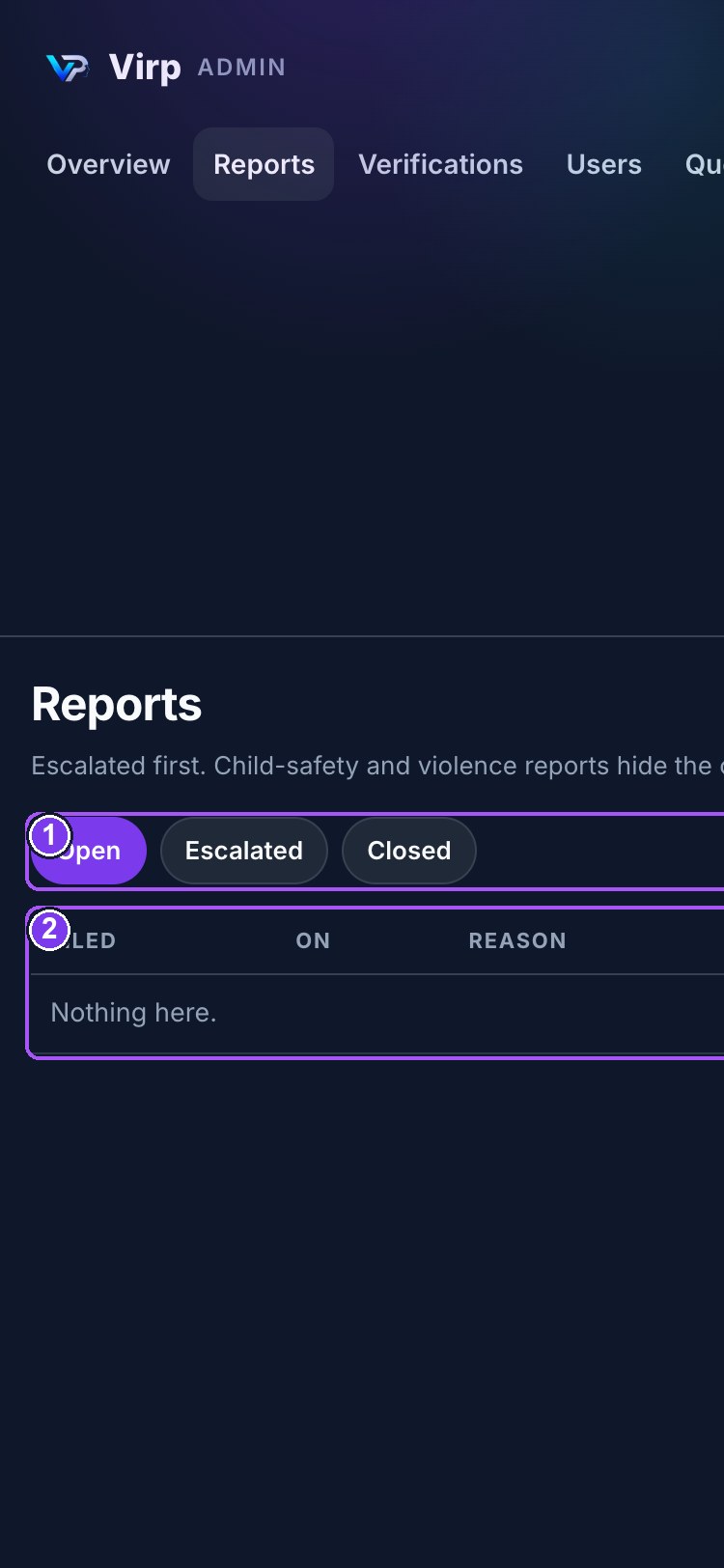
- 1Open · Escalated · Closed
- 2The queue — tap a row to review
/admin (also in the desktop rail for staff). Moderators see Reports, Verifications, Users and Quest proofs. Administrators see everything, including roles, Communities and the Audit log.
| Section | What you do there |
|---|---|
| Overview | what needs a person today: escalated and open reports, verifications and proofs waiting, account counts, latest actions |
| Reports | open / escalated / closed; open one to see the item, take it, hide or un-hide, dismiss, escalate, restrict the account |
| Verifications | the live selfie beside the ID, the date of birth to check; approve or reject with a reason; images are erased on decision, and every view is logged |
| Users | search and filter (verified, adults unverified, under 18, restricted, staff); per account: mode, verification, guardian consent, restriction, role, sign-in methods, password-reset link, awards, Stars correction |
| Quests | create, edit, publish, pause, close; eligibility and completion rules; review proofs — approve, reject, flag; participation statistics |
| News & events | write, pin, publish, filter by type / game / community / date |
| Tournaments | schedule, format, prize, entries; record placements — which writes the awards and points players see |
| Communities | name, description, guidelines, game, tier lock, 18+ flag, recruitment board |
| Audit log | every administrative, moderation, verification and safety action; append-only |
20. Terms, Privacy Notice and Community Guidelines
Working drafts for the owners’ lawyer to review and replace. They are the texts linked from sign-up, the business card and every community.
Community Guidelines
- Be decent. No harassment, bullying, hate speech, threats or sexual content.
- No scams, fraud, impersonation or spam.
- Keep other people’s personal information out of your posts. Share your own only through the business card, and only if you are a verified adult.
- Under-18 accounts read, like, vote and follow quests; they do not chat, comment or post.
- Report what crosses the line. Moderators read every report; serious safety reports page administrators immediately.
Privacy Notice (draft)
Virp collects the account details you give (handle, email, date of birth, games, city, picture, bio), what you do in the app (clips, likes, comments, quests, connections, reports), and, for adults who choose to verify, a live selfie and a photo of a government ID. Verification images are seen only by an authorised reviewer, compared, and deleted the moment a decision is made; the decision and date are kept. For under-18 accounts, a parent or guardian’s email and their consent are recorded. Data is stored on servers in Singapore, encrypted at rest and in transit. You can edit your basics in Settings, unpublish your business card at any time, and ask for your account to be closed. Administrators’ actions on your account are logged. This notice is governed by the Data Privacy Act of 2012 (RA 10173).
Terms (draft)
Accounts are for people 13 and over. You are responsible for what you post. Stars have no cash value and cannot be bought, sold or converted. Virp may hide content and restrict accounts that break the Community Guidelines. Verification is required for social features and may be refused. These terms will be replaced by the version approved by Virp’s counsel.